- Python 71.5%
- TypeScript 22.7%
- Shell 1.9%
- PowerShell 1.6%
- Rust 1.5%
- Other 0.7%
 79d9bf0c9a
* fix: account for KV cache in GGUF GPU fit check and auto-cap context length The GPU fit check only compared GGUF file size against free VRAM, ignoring KV cache memory. Models with large native context lengths (e.g. Qwen3.5-9B at 262k) would pass the fit check since the GGUF is only 5.6 GB, but the KV cache at 262k context needs ~40 GB at f16. This caused llama-server to silently fall back to CPU inference. Changes: - Parse block_count, head_count_kv, head_count, and embedding_length from GGUF metadata alongside context_length - Add KV cache VRAM estimation based on architecture params and the selected cache quantization type (f16, q8_0, q4_0, etc.) - Auto-reduce context length to the maximum that fits in available GPU VRAM when the native context would exceed it - Include estimated KV cache size in the _select_gpus total so the fit decision reflects actual runtime memory, not just file size For the reported scenario (Qwen3.5-9B on RTX 3090 with 22415 MiB free), context is auto-reduced from 262144 to ~63k with f16 KV cache, keeping the model fully on GPU. With q4_0 KV cache quantization the context can reach ~226k. * [pre-commit.ci] auto fixes from pre-commit.com hooks for more information, see https://pre-commit.ci * fix: resolve 6 bugs in KV cache VRAM estimation and add test harness - Fix q8_0 BPE constant: 1.125 -> 34/32 (1.0625) to match llama.cpp block size - Fix _fit_context_to_vram returning min_ctx when weights exceed budget (should return requested_ctx unchanged, let --fit handle it) - Fix binary search inflating below-2048 requests (lo=min_ctx=2048 > hi) - Fix n_ctx=0 regressing to 4096 when metadata unavailable (preserve sentinel) - Fix multi-GPU auto-cap using single-GPU budget instead of aggregate - Fix _context_length being overwritten with capped effective value Add tests/test_gguf_kv_vram.py: 43 cross-platform pytest tests covering pure logic, integration (monkeypatched load_model), and real GGUF parsing. Runs in an isolated uv venv with only pytest -- no GPU/torch/structlog needed. * [pre-commit.ci] auto fixes from pre-commit.com hooks for more information, see https://pre-commit.ci * fix: complete _effective_context_length lifecycle - Initialize _effective_context_length in __init__ (prevents AttributeError) - Reset _effective_context_length in unload_model (prevents stale values) - Update context_length property to return effective (capped) value for the UI/API, falling back to native _context_length if not set * fix: multi-GPU selection tries smallest subset first The previous approach summed all GPUs' memory to cap context, then selected GPUs afterward. This was overly optimistic for heterogeneous setups (e.g., 48 GiB + 4 GiB): the context was inflated by the tiny GPU's contribution, then both GPUs were dragged in. Now we try GPU subsets from smallest (1 GPU) to largest, capping context for each. We pick the smallest subset where the model+KV fits. This prefers single-GPU when possible (simpler, no tensor split overhead) and avoids pulling in GPUs that barely help. Add tests: test_multi_gpu_prefers_fewer_gpus, test_multi_gpu_heterogeneous. * [pre-commit.ci] auto fixes from pre-commit.com hooks for more information, see https://pre-commit.ci * fix: prefer fewer GPUs over higher context in GPU selection Multi-GPU inference is slower due to tensor-split overhead, so we should prefer fewer GPUs with reduced context over more GPUs with full context. Now the loop stops at the first GPU subset where the model fits, rather than continuing to find subsets that allow higher context. Only if the model can't fit on N GPUs do we try N+1. This preserves the original behavior: use multi-GPU only when the model doesn't fit on a single GPU. * fix: make _kill_orphaned_servers cross-platform via psutil Replace pgrep + os.kill(SIGKILL) with psutil.process_iter() and proc.kill(), which work on Linux, macOS, and Windows. Build an allowlist of install roots matching _find_llama_server_binary so only studio-managed servers are killed. * fix: skip KV estimation loop when effective context is unknown When n_ctx=0 and GGUF metadata lacks context_length, effective_ctx stays 0. _estimate_kv_cache_bytes(0) returns 0, so a GPU could be selected with no KV headroom. Guard the loop with effective_ctx > 0 to fall back to file-size-only GPU selection in this case. * chore: temporarily remove test harness (will add back separately) * refactor: deduplicate UINT32/UINT64 handling in GGUF parser Replace duplicated if/elif chains for vtype 4 and 10 with a single block using setattr. No behavioral change. * fix: honor explicit n_ctx by using multi-GPU before capping When the user explicitly sets n_ctx, try to fit the full requested context using _select_gpus (which adds GPUs as needed). Only cap context if it doesn't fit on any GPU combination. When n_ctx=0 (auto/native context), keep the existing behavior: prefer fewer GPUs with reduced context, since multi-GPU is slower and the user didn't ask for a specific context length. * [pre-commit.ci] auto fixes from pre-commit.com hooks for more information, see https://pre-commit.ci * fix: context_length property returns native value for frontend slider The frontend uses context_length as the slider max. Returning the capped effective value prevented users from requesting higher context on reload (e.g., after switching to q4_0 KV cache). Revert to returning the native GGUF metadata value -- the backend auto-caps at load time regardless. * revert: context_length returns effective (capped) value The UI slider should show what the server is actually running at, not the theoretical maximum. Revert to returning the effective context length. * fix: raise minimum context floor from 2048 to 4096 --------- Co-authored-by: pre-commit-ci[bot] <66853113+pre-commit-ci[bot]@users.noreply.github.com> |
||
|---|---|---|
| .github | ||
| images | ||
| scripts | ||
| studio | ||
| tests | ||
| unsloth | ||
| unsloth_cli | ||
| .gitattributes | ||
| .gitignore | ||
| .pre-commit-ci.yaml | ||
| .pre-commit-config.yaml | ||
| build.sh | ||
| cli.py | ||
| CODE_OF_CONDUCT.md | ||
| CONTRIBUTING.md | ||
| COPYING | ||
| install.ps1 | ||
| install.sh | ||
| LICENSE | ||
| pyproject.toml | ||
| README.md | ||
| unsloth-cli.py | ||

Run and train AI models with a unified local interface.
Features • Quickstart • Notebooks • Documentation • Reddit
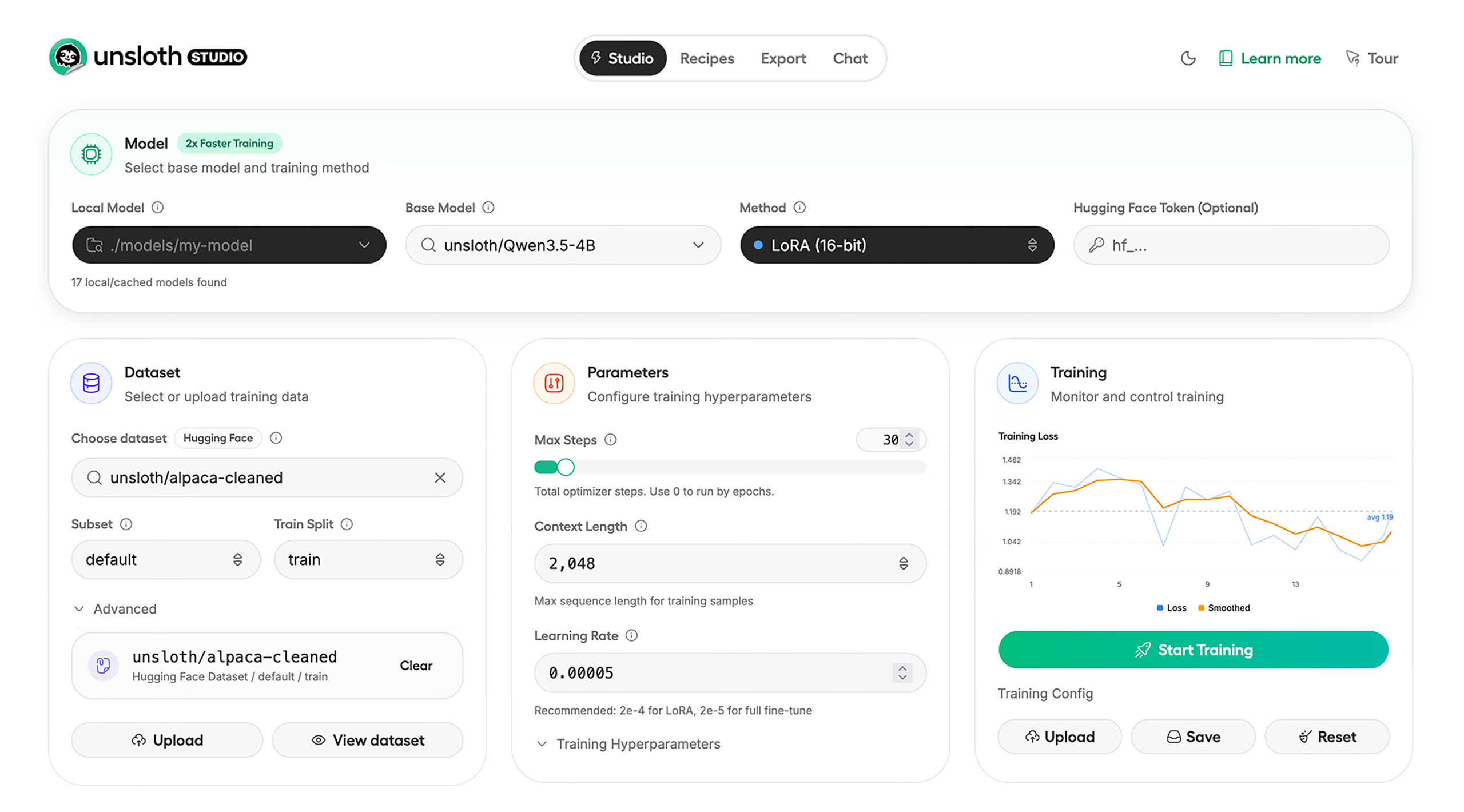
Unsloth Studio (Beta) lets you run and train text, audio, embedding, vision models on Windows, Linux and macOS.
⭐ Features
Unsloth provides several key features for both inference and training:
Inference
- Search + download + run models including GGUF, LoRA adapters, safetensors
- Export models: Save or export models to GGUF, 16-bit safetensors and other formats.
- Tool calling: Support for self-healing tool calling and web search
- Code execution: lets LLMs test code in Claude artifacts and sandbox environments
- Auto-tune inference parameters and customize chat templates.
- We work directly with teams behind gpt-oss, Qwen3, Llama 4, Mistral, Gemma 1-3, and Phi-4, where we’ve fixed bugs that improve model accuracy.
- Upload images, audio, PDFs, code, DOCX and more file types to chat with.
Training
- Train and RL 500+ models up to 2x faster with up to 70% less VRAM, with no accuracy loss.
- Custom Triton and mathematical kernels. See some collabs we did with PyTorch and Hugging Face.
- Data Recipes: Auto-create datasets from PDF, CSV, DOCX etc. Edit data in a visual-node workflow.
- Reinforcement Learning (RL): The most efficient RL library, using 80% less VRAM for GRPO, FP8 etc.
- Supports full fine-tuning, RL, pretraining, 4-bit, 16-bit and, FP8 training.
- Observability: Monitor training live, track loss and GPU usage and customize graphs.
- Multi-GPU training is supported, with major improvements coming soon.
⚡ Quickstart
Unsloth can be used in two ways: through Unsloth Studio, the web UI, or through Unsloth Core, the code-based version. Each has different requirements.
Unsloth Studio (web UI)
Unsloth Studio (Beta) works on Windows, Linux, WSL and macOS.
- CPU: Supported for Chat and Data Recipes currently
- NVIDIA: Training works on RTX 30/40/50, Blackwell, DGX Spark, Station and more
- macOS: Currently supports chat and Data Recipes. MLX training is coming very soon
- AMD: Chat + Data works. Train with Unsloth Core. Studio support is out soon.
- Coming soon: Training support for Apple MLX, AMD, and Intel.
- Multi-GPU: Available now, with a major upgrade on the way
macOS, Linux, WSL:
curl -fsSL https://unsloth.ai/install.sh | sh
Windows:
irm https://unsloth.ai/install.ps1 | iex
Launch
unsloth studio -H 0.0.0.0 -p 8888
Update
unsloth studio update
Docker
Use our Docker image unsloth/unsloth container. Run:
docker run -d -e JUPYTER_PASSWORD="mypassword" \
  -p 8888:8888 -p 8000:8000 -p 2222:22 \
  -v $(pwd)/work:/workspace/work \
  --gpus all \
  unsloth/unsloth
Developer, Nightly, Uninstall
To see developer, nightly and uninstallation etc. instructions, see advanced installation.
Unsloth Core (code-based)
Linux, WSL:
curl -LsSf https://astral.sh/uv/install.sh | sh
uv venv unsloth_env --python 3.13
source unsloth_env/bin/activate
uv pip install unsloth --torch-backend=auto
Windows:
winget install -e --id Python.Python.3.13
winget install --id=astral-sh.uv  -e
uv venv unsloth_env --python 3.13
.\unsloth_env\Scripts\activate
uv pip install unsloth --torch-backend=auto
For Windows, pip install unsloth works only if you have PyTorch installed. Read our Windows Guide.
You can use the same Docker image as Unsloth Studio.
AMD, Intel:
For RTX 50x, B200, 6000 GPUs: uv pip install unsloth --torch-backend=auto. Read our guides for: Blackwell and DGX Spark.
To install Unsloth on AMD and Intel GPUs, follow our AMD Guide and Intel Guide.
✨ Free Notebooks
Train for free with our notebooks. Read our guide. Add dataset, run, then deploy your trained model.
| Model | Free Notebooks | Performance | Memory use |
|---|---|---|---|
| Qwen3.5 (4B) | ▶️ Start for free | 1.5x faster | 60% less |
| gpt-oss (20B) | ▶️ Start for free | 2x faster | 70% less |
| Qwen3.5 GSPO | ▶️ Start for free | 2x faster | 70% less |
| gpt-oss (20B): GRPO | ▶️ Start for free | 2x faster | 80% less |
| Qwen3: Advanced GRPO | ▶️ Start for free | 2x faster | 70% less |
| Gemma 3 (4B) Vision | ▶️ Start for free | 1.7x faster | 60% less |
| embeddinggemma (300M) | ▶️ Start for free | 2x faster | 20% less |
| Mistral Ministral 3 (3B) | ▶️ Start for free | 1.5x faster | 60% less |
| Llama 3.1 (8B) Alpaca | ▶️ Start for free | 2x faster | 70% less |
| Llama 3.2 Conversational | ▶️ Start for free | 2x faster | 70% less |
| Orpheus-TTS (3B) | ▶️ Start for free | 1.5x faster | 50% less |
- See all our notebooks for: Kaggle, GRPO, TTS, embedding & Vision
- See all our models and all our notebooks
- See detailed documentation for Unsloth here
🦥 Unsloth News
- Introducing Unsloth Studio: our new web UI for running and training LLMs. Blog
- Qwen3.5 - 0.8B, 2B, 4B, 9B, 27B, 35-A3B, 112B-A10B are now supported. Guide + notebooks
- Train MoE LLMs 12x faster with 35% less VRAM - DeepSeek, GLM, Qwen and gpt-oss. Blog
- Embedding models: Unsloth now supports ~1.8-3.3x faster embedding fine-tuning. Blog • Notebooks
- New 7x longer context RL vs. all other setups, via our new batching algorithms. Blog
- New RoPE & MLP Triton Kernels & Padding Free + Packing: 3x faster training & 30% less VRAM. Blog
- 500K Context: Training a 20B model with >500K context is now possible on an 80GB GPU. Blog
- FP8 & Vision RL: You can now do FP8 & VLM GRPO on consumer GPUs. FP8 Blog • Vision RL
- gpt-oss by OpenAI: Read our RL blog, Flex Attention blog and Guide.
📥 Advanced Installation
The below advanced instructions are for Unsloth Studio. For Unsloth Core advanced installation, view our docs.
Developer installs: macOS, Linux, WSL:
git clone https://github.com/unslothai/unsloth
cd unsloth
./install.sh --local
unsloth studio -H 0.0.0.0 -p 8888
Then to update :
unsloth studio update --local
Developer installs: Windows PowerShell:
git clone https://github.com/unslothai/unsloth.git
cd unsloth
Set-ExecutionPolicy -Scope Process -ExecutionPolicy Bypass
.\install.ps1 --local
unsloth studio -H 0.0.0.0 -p 8888
Then to update :
unsloth studio update --local
Nightly: MacOS, Linux, WSL:
git clone https://github.com/unslothai/unsloth
cd unsloth
git checkout nightly
./install.sh --local
unsloth studio -H 0.0.0.0 -p 8888
Then to launch every time:
unsloth studio -H 0.0.0.0 -p 8888
Nightly: Windows:
Run in Windows Powershell:
git clone https://github.com/unslothai/unsloth.git
cd unsloth
git checkout nightly
Set-ExecutionPolicy -Scope Process -ExecutionPolicy Bypass
.\install.ps1 --local
unsloth studio -H 0.0.0.0 -p 8888
Then to launch every time:
unsloth studio -H 0.0.0.0 -p 8888
Uninstall
You can uninstall Unsloth Studio by deleting its install folder usually located under $HOME/.unsloth/studio on Mac/Linux/WSL and %USERPROFILE%\.unsloth\studio on Windows. Using the rm -rf commands will delete everything, including your history, cache:
- MacOS, WSL, Linux:
rm -rf ~/.unsloth/studio - Windows (PowerShell):
Remove-Item -Recurse -Force "$HOME\.unsloth\studio"
For more info, see our docs.
Deleting model files
You can delete old model files either from the bin icon in model search or by removing the relevant cached model folder from the default Hugging Face cache directory. By default, HF uses:
- MacOS, Linux, WSL:
~/.cache/huggingface/hub/ - Windows:
%USERPROFILE%\.cache\huggingface\hub\
💚 Community and Links
| Type | Links |
|---|---|
 Discord Discord |
Join Discord server |
 r/unsloth Reddit r/unsloth Reddit |
Join Reddit community |
| 📚 Documentation & Wiki | Read Our Docs |
_logo_late_2025.svg) Twitter (aka X) Twitter (aka X) |
Follow us on X |
| 🔮 Our Models | Unsloth Catalog |
| ✍️ Blog | Read our Blogs |
Citation
You can cite the Unsloth repo as follows:
@software{unsloth,
  author = {Daniel Han, Michael Han and Unsloth team},
  title = {Unsloth},
  url = {https://github.com/unslothai/unsloth},
  year = {2023}
}
If you trained a model with 🦥Unsloth, you can use this cool sticker!
License
Unsloth uses a dual-licensing model of Apache 2.0 and AGPL-3.0. The core Unsloth package remains licensed under Apache 2.0, while certain optional components, such as the Unsloth Studio UI are licensed under the open-source license AGPL-3.0.
This structure helps support ongoing Unsloth development while keeping the project open source and enabling the broader ecosystem to continue growing.
Thank You to
- The llama.cpp library that lets users run and save models with Unsloth
- The Hugging Face team and their libraries: transformers and TRL
- The Pytorch and Torch AO team for their contributions
- NVIDIA for their NeMo DataDesigner library and their contributions
- And of course for every single person who has contributed or has used Unsloth!