- Go 82.8%
- HTML 6%
- Python 5.7%
- Shell 3.8%
- Dockerfile 1.4%
- Other 0.3%
 cef8f2bfef
## [1.2.1-alpha.1](https://codeberg.org/goern/forgejo-mcp/compare/v1.2.0...v1.2.1-alpha.1) (2025-04-15) ### 🔁 Chore * **deps:** pin node.js to 9bef0ef ([ |
||
|---|---|---|
| .husky | ||
| .social-media | ||
| images | ||
| project | ||
| scripts | ||
| src | ||
| .containerignore | ||
| .env.sample | ||
| .gitignore | ||
| .npmignore | ||
| .prettierignore | ||
| .prettierrc | ||
| .releaserc | ||
| .renovaterc | ||
| .roomodes | ||
| .roorules | ||
| CHANGELOG.md | ||
| Containerfile | ||
| jest.config.js | ||
| jest.setup.ts | ||
| LICENSE | ||
| mcp-settings-sample.json | ||
| package-lock.json | ||
| package.json | ||
| README.md | ||
| smithery.yaml | ||
| tsconfig.json | ||
Forgejo MCP Server

This is a Model Context Protocol (MCP) server that provides tools and resources for interacting with Forgejo REST API, for example the one hosted at https://codeberg.org/.
Features
- List and get repositories
- List, get, and create issues
- Get user information
- Dependency injection for modular architecture
- Robust error handling and request processing
- Caching layer for improved performance
- Comprehensive unit and integration tests
- Enhanced Forgejo issue management commands
Installation
Installing via Smithery
To install forgejo-mcp for Claude Desktop automatically via Smithery:
npx -y @smithery/cli install @goern/forgejo-mcp --client claude
Manual Installation
-
Clone this repository
-
Install dependencies:
npm install -
Build the project:
npm run build -
NPM
The module is also published to https://www.npmjs.com/package/forgejo-mcp
Configuration
To use this MCP server, you need to:
-
Generate a Codeberg API token:
Option 1: Use the helper script:
npm run get-tokenThis will open your browser to the Codeberg applications settings page.
Option 2: Manually navigate to:
- Go to your Codeberg settings: https://codeberg.org/user/settings/applications
- Generate a new token with appropriate permissions (repo, user)
- Copy the token (it will only be shown once!)
-
Configure the API token:
Option 1: Using a .env file (recommended for development):
Copy the
.env.samplefile to.envin the project root and add your token:cp .env.sample .envThen edit the
.envfile to add your Codeberg API token:CODEBERG_API_TOKEN=your_token_hereOption 2: Using the MCP settings file:
For VSCode, edit the MCP settings file located at:
- Windows:
%APPDATA%\Code\User\globalStorage\rooveterinaryinc.roo-cline\settings\mcp_settings.json - macOS:
~/Library/Application Support/Code/User/globalStorage/rooveterinaryinc.roo-cline/settings/mcp_settings.json - Linux:
~/.config/Code/User/globalStorage/rooveterinaryinc.roo-cline/settings/mcp_settings.json
Add the following configuration (a sample file is provided at
mcp-settings-sample.json):{ "mcpServers": { "codeberg": { "command": "node", "args": ["/absolute/path/to/mcp-codeberg/build/index.js"], "env": { "CODEBERG_API_TOKEN": "your-api-token-here" }, "disabled": false, "alwaysAllow": [] } } } - Windows:
Running the Server
The MCP server can be run in two modes:
Stdio Mode (Default)
This is the default mode used by MCP clients like VSCode.
npm start
# or
node build/index.js
HTTP Mode
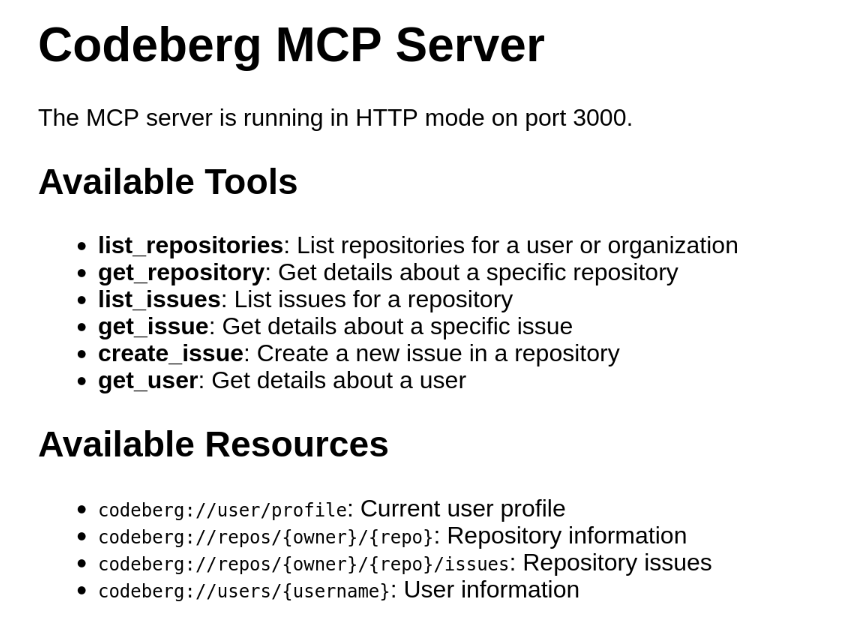
You can also run the server in HTTP mode, which starts a web server that provides information about the MCP server.
npm run start:http
# or
node build/index.js --sse --port 3000 --host localhost
Command line options:
--sse: Enable HTTP mode (default: false)--port: Port to use for HTTP mode (default: 3000)--host: Host to bind to for HTTP mode (default: localhost)--help: Show help information
Example:
# Run in HTTP mode on port 8080
node build/index.js --sse --port 8080

# Run in HTTP mode binding to all interfaces
node build/index.js --sse --host 0.0.0.0

# Show help information
node build/index.js --help
The HTTP server will look something like
Available Tools
list_repositories
Lists repositories for a user or organization.
Parameters:
owner: Username or organization name
Example:
{
  "owner": "username"
}
get_repository
Gets details about a specific repository.
Parameters:
owner: Repository ownername: Repository name
Example:
{
  "owner": "username",
  "name": "repo-name"
}
list_issues
Lists issues for a repository.
Parameters:
owner: Repository ownerrepo: Repository namestate: Issue state (open, closed, all) - optional, defaults to "open"
Example:
{
  "owner": "username",
  "repo": "repo-name",
  "state": "open"
}
get_issue
Gets details about a specific issue.
Parameters:
owner: Repository ownerrepo: Repository namenumber: Issue number
Example:
{
  "owner": "username",
  "repo": "repo-name",
  "number": 1
}
create_issue
Creates a new issue in a repository.
Parameters:
owner: Repository ownerrepo: Repository nametitle: Issue titlebody: Issue body
Example:
{
  "owner": "username",
  "repo": "repo-name",
  "title": "Bug: Something is not working",
  "body": "Detailed description of the issue"
}
get_user
Gets details about a user.
Parameters:
username: Username
Example:
{
  "username": "username"
}
Available Resources
Current User Profile
URI: codeberg://user/profile
Repository Information
URI Template: codeberg://repos/{owner}/{repo}
Repository Issues
URI Template: codeberg://repos/{owner}/{repo}/issues
User Information
URI Template: codeberg://users/{username}
Development Costs
up until commit 6ae7ebe103 the cost has been:
Tokens i/o: 3.4m/28.3k
Context Window: 85.9k of 200.0k
API Cost: $2.1752
Model: claude-3.7-sonnet via openrouter.ai
License
GPL-3.0-or-later