- Python 71.5%
- TypeScript 22.7%
- Shell 1.9%
- PowerShell 1.6%
- Rust 1.5%
- Other 0.7%
 e318da21a7
* Fix ~1.2s TTFT penalty when tools are enabled in Studio When users enable web search, Python execution, or terminal tools, every message gets a ~1.2s delay before any text appears -- even when the model does not call any tool. This happens because generate_chat_completion_with_tools() does a non-streaming detection pass (stream: False) first, waits for the complete response, then checks for tool calls. For the ~90% of messages that don't trigger a tool call, this blocking wait is entirely wasted. Root cause: the detection pass payload uses stream: False, forcing llama-server to generate the entire response before returning any tokens. Fix: replace the non-streaming detection pass with a streaming pass (stream: True) and a speculative buffer state machine that detects tool signals in the first 1-2 SSE chunks: - BUFFERING: accumulate content tokens, check first chars for tool signal prefixes (<tool_call>, <function=) - STREAMING: no tool detected, yield tokens to caller immediately - DRAINING: tool signal found, silently accumulate rest of stream Three detection paths: 1. Structured delta.tool_calls -- detected instantly, transition to DRAINING, accumulate fragments, assemble at stream end. 2. XML tool markup in content -- buffer holds up to 32 chars checking for <tool_call> or <function= prefix, then transitions to DRAINING. 3. No tool signal -- first non-whitespace, non-XML char triggers immediate transition to STREAMING (fast path, ~90% of requests). Safety net: after any stream ends in STREAMING state, check accumulated content for XML tool signals. Handles rare "content before tool call" edge case. Additional supporting changes: - Add headers parameter to _stream_with_retry for auth forwarding - Share _strip_tool_markup and regex patterns between the detection pass and the final streaming pass (removes duplication) - Remove the iteration==0 non-streaming content shortcut (no longer needed since all iterations stream directly) - Keep the final streaming pass as fallback for max_tool_iterations exhaustion Benchmarked on Qwen3.5-4B Q4_K_XL: - No tools: TTFT ~112ms (unchanged) - Tools enabled, no call: TTFT ~112ms (was ~1207ms) - Decode TPS: 226 (unchanged in all cases) * [pre-commit.ci] auto fixes from pre-commit.com hooks for more information, see https://pre-commit.ci * Add unit tests for streaming tool detection state machine 16 tests covering every tool call parsing path: - Plain text (no tool call) streaming - Structured delta.tool_calls detection and fragment assembly - XML <tool_call>JSON</tool_call> detection via buffer - XML <function=name> tag detection via buffer - Whitespace before tool XML - Safety net (content then tool XML) - Parallel multi-tool calls - Reasoning token bypass (thinking models) - Reasoning then tool call - Empty response handling - Buffer prefix timeout (HTML not mistaken for tool) - Non-XML first char instant streaming - False positive rejection (<tool_tip> vs <tool_call>) - Arguments split across multiple chunks - auto_heal_tool_calls=False respects the flag - Metrics accumulation across tool iterations * [pre-commit.ci] auto fixes from pre-commit.com hooks for more information, see https://pre-commit.ci * Fix reasoning-only BUFFERING, pre-tool content emission, and code duplication Addresses review feedback on the streaming tool detection: 1. Reasoning tokens are no longer yielded during BUFFERING/DRAINING states. The consumer in routes/inference.py tracks prev_text across tool iterations without resetting it, so yielding reasoning during a detection pass that resolves to a tool call would corrupt the delta computation for subsequent iterations. Reasoning is now silently accumulated during detection (matching the old non-streaming behavior) and flushed together with content when the buffer resolves to STREAMING. 2. Handle reasoning-only responses in the BUFFERING resolver. When a thinking model emits only reasoning_content with no content tokens, the stream ends while still in BUFFERING state. The resolver now detects this case and yields reasoning as plain text (without <think> wrapper), matching the final streaming pass behavior for models like Qwen3 in always-think mode. 3. Replace duplicated re.sub calls for stripping tool markup with the existing _strip_tool_markup(content_text, final=True) helper, removing ~40 lines of redundant regex code. 4. Update tests: adjust reasoning test expectations to match the new behavior (reasoning batched with content, not streamed individually during BUFFERING). Add test_reasoning_only_no_content for the reasoning-only edge case. 17/17 tests pass. * [pre-commit.ci] auto fixes from pre-commit.com hooks for more information, see https://pre-commit.ci * Address remaining reviewer findings: late tool_call IDs and XML speculation 1. Late-arriving tool_calls.id: when a provider sends the real ID on a later delta chunk (after the initial one with index and function name), the accumulator now updates the ID instead of keeping the synthetic "call_{idx}" placeholder. (P2, 2/10 reviewers) 2. XML speculation respects auto_heal_tool_calls: when auto_heal is explicitly disabled, _TOOL_XML_SIGNALS is empty so the BUFFERING state never speculatively holds content for XML prefix detection. Content starting with literal "<tool_call>" or "<function=" text flows straight through without delay. (P2, 1/10 reviewers) Skipped: finish_reason="tool_calls" without delta.tool_calls fallback (P1, 1/10 reviewers). llama-server always sends delta.tool_calls fragments in streaming mode. A non-streaming fallback for this edge case would add complexity for a scenario that does not occur in practice with the supported backend. * [pre-commit.ci] auto fixes from pre-commit.com hooks for more information, see https://pre-commit.ci * Check request.is_disconnected() every 20 tokens instead of every token The disconnect check is an async round-trip that adds overhead on every loop iteration. Since the cancel watcher in llama_cpp.py already handles connection teardown (closes the streaming response on cancel), this route-layer check is a secondary safety net that does not need to run on every single token. Check every 20 tokens across all 4 streaming paths: - gguf_tool_stream (tool-enabled GGUF) - gguf_stream_chunks (standard GGUF) - audio_input_generate (audio/whisper input) - generic backend stream (non-GGUF fallback) * Fix safety net, DRAINING metadata, and test import path 1. Safety net no longer retroactively executes tools after visible content was already emitted to the user. Once _last_emitted is non-empty, the stream is committed to normal content mode. Retroactive tool execution after visible output would violate the streaming contract and corrupt the route-layer cumulative delta tracker (prev_text). The tool XML is still stripped by _strip_tool_markup so the user sees clean content. 2. DRAINING false-positive path now merges accumulated metrics from prior tool iterations instead of dropping them. Uses the same merge formula as the STREAMING path. 3. Test import path fixed to use repo root instead of hardcoded sibling directory. Works in clean checkouts and CI. 4. Renamed test_content_then_tool_xml_safety_net to test_content_then_tool_xml_no_retroactive_execution to reflect the corrected behavior. 17/17 tests pass. * [pre-commit.ci] auto fixes from pre-commit.com hooks for more information, see https://pre-commit.ci * Redact --api-key value from llama-server startup log When UNSLOTH_DIRECT_STREAM=1, the generated bearer token was logged verbatim in the startup command. Replace the secret with <redacted> before logging. * Remove test file temporarily * Revert disconnect throttle, reset prev_text on tool_start, restore XML safety net Addresses all P1 findings from reviewer round 3 (10 reviewers): 1. Revert disconnect check to every iteration (was every 20th). All 10 reviewers flagged this as a correctness regression for short streams and sparse tool event loops. The cancel watcher in llama_cpp.py is the primary mechanism but the route-layer check must remain per-iteration for completeness. [10/10] 2. Reset prev_text on tool_start in gguf_tool_stream. When a tool cycle begins after visible content was already streamed, the route-layer cumulative delta tracker (prev_text) must be reset so the post-tool synthesis response is not truncated or dropped. [9/10] 3. Remove the _last_emitted gate from the XML safety net. The gate was added to prevent retroactive tool execution after visible content, but with prev_text now reset on tool_start (#2), the root cause is fixed and the safety net can correctly handle content-then-tool-XML responses (matching pre-PR behavior). [8/10] * Use None instead of {} for empty auth headers in TTS methods * Include accumulated metrics in STREAMING metadata check * [pre-commit.ci] auto fixes from pre-commit.com hooks for more information, see https://pre-commit.ci --------- Co-authored-by: pre-commit-ci[bot] <66853113+pre-commit-ci[bot]@users.noreply.github.com> |
||
|---|---|---|
| .github | ||
| images | ||
| scripts | ||
| studio | ||
| tests | ||
| unsloth | ||
| unsloth_cli | ||
| .gitattributes | ||
| .gitignore | ||
| .pre-commit-ci.yaml | ||
| .pre-commit-config.yaml | ||
| build.sh | ||
| cli.py | ||
| CODE_OF_CONDUCT.md | ||
| CONTRIBUTING.md | ||
| COPYING | ||
| install.ps1 | ||
| install.sh | ||
| LICENSE | ||
| pyproject.toml | ||
| README.md | ||
| unsloth-cli.py | ||

Run and train AI models with a unified local interface.
Features • Quickstart • Notebooks • Documentation • Reddit
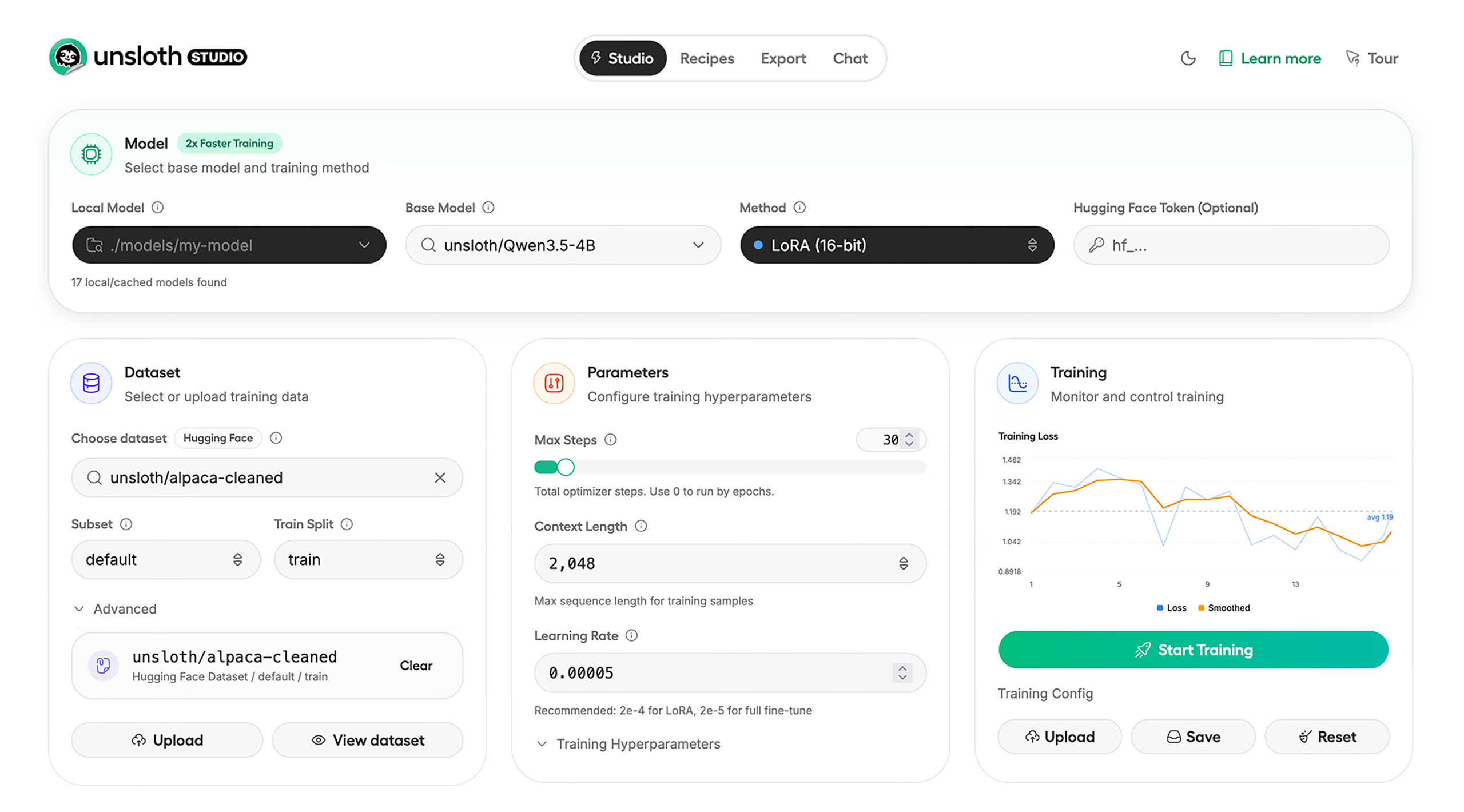
Unsloth Studio (Beta) lets you run and train text, audio, embedding, vision models on Windows, Linux and macOS.
⭐ Features
Unsloth provides several key features for both inference and training:
Inference
- Search + download + run models including GGUF, LoRA adapters, safetensors
- Export models: Save or export models to GGUF, 16-bit safetensors and other formats.
- Tool calling: Support for self-healing tool calling and web search
- Code execution: lets LLMs test code in Claude artifacts and sandbox environments
- Auto-tune inference parameters and customize chat templates.
- We work directly with teams behind gpt-oss, Qwen3, Llama 4, Mistral, Gemma 1-3, and Phi-4, where we’ve fixed bugs that improve model accuracy.
- Upload images, audio, PDFs, code, DOCX and more file types to chat with.
Training
- Train and RL 500+ models up to 2x faster with up to 70% less VRAM, with no accuracy loss.
- Custom Triton and mathematical kernels. See some collabs we did with PyTorch and Hugging Face.
- Data Recipes: Auto-create datasets from PDF, CSV, DOCX etc. Edit data in a visual-node workflow.
- Reinforcement Learning (RL): The most efficient RL library, using 80% less VRAM for GRPO, FP8 etc.
- Supports full fine-tuning, RL, pretraining, 4-bit, 16-bit and, FP8 training.
- Observability: Monitor training live, track loss and GPU usage and customize graphs.
- Multi-GPU training is supported, with major improvements coming soon.
⚡ Quickstart
Unsloth can be used in two ways: through Unsloth Studio, the web UI, or through Unsloth Core, the code-based version. Each has different requirements.
Unsloth Studio (web UI)
Unsloth Studio (Beta) works on Windows, Linux, WSL and macOS.
- CPU: Supported for Chat and Data Recipes currently
- NVIDIA: Training works on RTX 30/40/50, Blackwell, DGX Spark, Station and more
- macOS: Currently supports chat and Data Recipes. MLX training is coming very soon
- AMD: Chat + Data works. Train with Unsloth Core. Studio support is out soon.
- Coming soon: Training support for Apple MLX, AMD, and Intel.
- Multi-GPU: Available now, with a major upgrade on the way
macOS, Linux, WSL:
curl -fsSL https://unsloth.ai/install.sh | sh
Windows:
irm https://unsloth.ai/install.ps1 | iex
Launch
unsloth studio -H 0.0.0.0 -p 8888
Update
unsloth studio update
Docker
Use our Docker image unsloth/unsloth container. Run:
docker run -d -e JUPYTER_PASSWORD="mypassword" \
  -p 8888:8888 -p 8000:8000 -p 2222:22 \
  -v $(pwd)/work:/workspace/work \
  --gpus all \
  unsloth/unsloth
Developer, Nightly, Uninstall
To see developer, nightly and uninstallation etc. instructions, see advanced installation.
Unsloth Core (code-based)
Linux, WSL:
curl -LsSf https://astral.sh/uv/install.sh | sh
uv venv unsloth_env --python 3.13
source unsloth_env/bin/activate
uv pip install unsloth --torch-backend=auto
Windows:
winget install -e --id Python.Python.3.13
winget install --id=astral-sh.uv  -e
uv venv unsloth_env --python 3.13
.\unsloth_env\Scripts\activate
uv pip install unsloth --torch-backend=auto
For Windows, pip install unsloth works only if you have PyTorch installed. Read our Windows Guide.
You can use the same Docker image as Unsloth Studio.
AMD, Intel:
For RTX 50x, B200, 6000 GPUs: uv pip install unsloth --torch-backend=auto. Read our guides for: Blackwell and DGX Spark.
To install Unsloth on AMD and Intel GPUs, follow our AMD Guide and Intel Guide.
✨ Free Notebooks
Train for free with our notebooks. Read our guide. Add dataset, run, then deploy your trained model.
| Model | Free Notebooks | Performance | Memory use |
|---|---|---|---|
| Qwen3.5 (4B) | ▶️ Start for free | 1.5x faster | 60% less |
| gpt-oss (20B) | ▶️ Start for free | 2x faster | 70% less |
| Qwen3.5 GSPO | ▶️ Start for free | 2x faster | 70% less |
| gpt-oss (20B): GRPO | ▶️ Start for free | 2x faster | 80% less |
| Qwen3: Advanced GRPO | ▶️ Start for free | 2x faster | 70% less |
| Gemma 3 (4B) Vision | ▶️ Start for free | 1.7x faster | 60% less |
| embeddinggemma (300M) | ▶️ Start for free | 2x faster | 20% less |
| Mistral Ministral 3 (3B) | ▶️ Start for free | 1.5x faster | 60% less |
| Llama 3.1 (8B) Alpaca | ▶️ Start for free | 2x faster | 70% less |
| Llama 3.2 Conversational | ▶️ Start for free | 2x faster | 70% less |
| Orpheus-TTS (3B) | ▶️ Start for free | 1.5x faster | 50% less |
- See all our notebooks for: Kaggle, GRPO, TTS, embedding & Vision
- See all our models and all our notebooks
- See detailed documentation for Unsloth here
🦥 Unsloth News
- Introducing Unsloth Studio: our new web UI for running and training LLMs. Blog
- Qwen3.5 - 0.8B, 2B, 4B, 9B, 27B, 35-A3B, 112B-A10B are now supported. Guide + notebooks
- Train MoE LLMs 12x faster with 35% less VRAM - DeepSeek, GLM, Qwen and gpt-oss. Blog
- Embedding models: Unsloth now supports ~1.8-3.3x faster embedding fine-tuning. Blog • Notebooks
- New 7x longer context RL vs. all other setups, via our new batching algorithms. Blog
- New RoPE & MLP Triton Kernels & Padding Free + Packing: 3x faster training & 30% less VRAM. Blog
- 500K Context: Training a 20B model with >500K context is now possible on an 80GB GPU. Blog
- FP8 & Vision RL: You can now do FP8 & VLM GRPO on consumer GPUs. FP8 Blog • Vision RL
- gpt-oss by OpenAI: Read our RL blog, Flex Attention blog and Guide.
📥 Advanced Installation
The below advanced instructions are for Unsloth Studio. For Unsloth Core advanced installation, view our docs.
Developer installs: macOS, Linux, WSL:
git clone https://github.com/unslothai/unsloth
cd unsloth
./install.sh --local
unsloth studio -H 0.0.0.0 -p 8888
Then to update :
unsloth studio update --local
Developer installs: Windows PowerShell:
git clone https://github.com/unslothai/unsloth.git
cd unsloth
Set-ExecutionPolicy -Scope Process -ExecutionPolicy Bypass
.\install.ps1 --local
unsloth studio -H 0.0.0.0 -p 8888
Then to update :
unsloth studio update --local
Nightly: MacOS, Linux, WSL:
git clone https://github.com/unslothai/unsloth
cd unsloth
git checkout nightly
./install.sh --local
unsloth studio -H 0.0.0.0 -p 8888
Then to launch every time:
unsloth studio -H 0.0.0.0 -p 8888
Nightly: Windows:
Run in Windows Powershell:
git clone https://github.com/unslothai/unsloth.git
cd unsloth
git checkout nightly
Set-ExecutionPolicy -Scope Process -ExecutionPolicy Bypass
.\install.ps1 --local
unsloth studio -H 0.0.0.0 -p 8888
Then to launch every time:
unsloth studio -H 0.0.0.0 -p 8888
Uninstall
You can uninstall Unsloth Studio by deleting its install folder usually located under $HOME/.unsloth/studio on Mac/Linux/WSL and %USERPROFILE%\.unsloth\studio on Windows. Using the rm -rf commands will delete everything, including your history, cache:
- MacOS, WSL, Linux:
rm -rf ~/.unsloth/studio - Windows (PowerShell):
Remove-Item -Recurse -Force "$HOME\.unsloth\studio"
For more info, see our docs.
Deleting model files
You can delete old model files either from the bin icon in model search or by removing the relevant cached model folder from the default Hugging Face cache directory. By default, HF uses:
- MacOS, Linux, WSL:
~/.cache/huggingface/hub/ - Windows:
%USERPROFILE%\.cache\huggingface\hub\
💚 Community and Links
| Type | Links |
|---|---|
 Discord Discord |
Join Discord server |
 r/unsloth Reddit r/unsloth Reddit |
Join Reddit community |
| 📚 Documentation & Wiki | Read Our Docs |
_logo_late_2025.svg) Twitter (aka X) Twitter (aka X) |
Follow us on X |
| 🔮 Our Models | Unsloth Catalog |
| ✍️ Blog | Read our Blogs |
Citation
You can cite the Unsloth repo as follows:
@software{unsloth,
  author = {Daniel Han, Michael Han and Unsloth team},
  title = {Unsloth},
  url = {https://github.com/unslothai/unsloth},
  year = {2023}
}
If you trained a model with 🦥Unsloth, you can use this cool sticker!
License
Unsloth uses a dual-licensing model of Apache 2.0 and AGPL-3.0. The core Unsloth package remains licensed under Apache 2.0, while certain optional components, such as the Unsloth Studio UI are licensed under the open-source license AGPL-3.0.
This structure helps support ongoing Unsloth development while keeping the project open source and enabling the broader ecosystem to continue growing.
Thank You to
- The llama.cpp library that lets users run and save models with Unsloth
- The Hugging Face team and their libraries: transformers and TRL
- The Pytorch and Torch AO team for their contributions
- NVIDIA for their NeMo DataDesigner library and their contributions
- And of course for every single person who has contributed or has used Unsloth!