- Python 71.5%
- TypeScript 22.7%
- Shell 1.9%
- PowerShell 1.6%
- Rust 1.5%
- Other 0.7%
 9c95148045
* Add elapsed timer to tool status pill in Studio Show a count-up seconds timer (0s, 1s, 2s, ...) next to the tool status text in the composer area. Helps users gauge how long a tool call (web search, code execution) has been running. Timer resets when a new tool starts and disappears when all tools finish. * Fix tool call parsing, add tool outputs panel and reasoning copy button Backend: - Rewrite tool call XML parser to use balanced-brace JSON extraction instead of greedy regex, fixing truncation on nested braces in code/JSON arguments - Handle optional closing tags (</tool_call>, </function>, </parameter>) that models frequently omit - Support bare <function=...> tags without <tool_call> wrapper - Strip tool call markup from streamed content so raw XML never leaks into the chat UI - Use a persistent ~/studio_sandbox/ working directory for tool execution so files persist across calls within a session - Emit tool_start/tool_end SSE events so the frontend can display tool inputs and outputs Frontend: - Add collapsible "Tool Outputs" panel below assistant messages showing each tool call's input and output with copy buttons - Add copy button to reasoning blocks - Add elapsed timer to tool status pill - Update project URLs in pyproject.toml (http -> https, add docs link) * [pre-commit.ci] auto fixes from pre-commit.com hooks for more information, see https://pre-commit.ci * Add interactive HTML preview with fullscreen toggle for code blocks HTML code fences now render an interactive sandboxed iframe preview below the syntax-highlighted code, similar to how SVG fences show an image preview. The iframe uses sandbox="allow-scripts" to allow JavaScript execution while blocking access to the parent page. Includes a fullscreen toggle (enlarge/minimize button) that expands the preview into a viewport overlay, dismissible via button, Escape key, or backdrop click. A streaming placeholder prevents partial HTML from rendering mid-stream. * Add tool call settings: auto-heal toggle, max iterations, timeout Add three user-configurable tool call settings to the Studio Settings panel: - Auto Heal Tool Calls: toggle to control fallback XML parsing of malformed tool calls from model output (default: on) - Max Tool Calls Per Message: slider 0-40 + Max to cap tool call iterations per message (default: 10) - Max Tool Call Duration: slider 1-30 minutes + Max to set per-tool-call execution timeout (default: 5 minutes) All settings persist to localStorage and flow through the full stack: frontend store -> API request -> Pydantic model -> route -> llama_cpp -> tools. * [pre-commit.ci] auto fixes from pre-commit.com hooks for more information, see https://pre-commit.ci * Fix tool call timeout: respect no-limit and apply to web search - Use a sentinel to distinguish timeout=None (no limit) from the default (300s). Previously None was silently replaced with _EXEC_TIMEOUT. - Pass the configured timeout to DDGS() for web searches so the setting applies uniformly to all tool types. * [pre-commit.ci] auto fixes from pre-commit.com hooks for more information, see https://pre-commit.ci * Add input validation bounds and per-thread sandbox isolation - Add ge=0 constraint to max_tool_calls_per_message (rejects negative values) - Add ge=1 constraint to tool_call_timeout (minimum 1 second) - Thread session_id from frontend through backend to tool execution - Scope sandbox directories per conversation: ~/studio_sandbox/{thread_id}/ - Backwards compatible: API callers without session_id use ~/studio_sandbox/ * [pre-commit.ci] auto fixes from pre-commit.com hooks for more information, see https://pre-commit.ci * Fix non-monotonic streaming and Python temp script path - Split tool markup stripping into closed-only (mid-stream) and full (final flush) to prevent cumulative text from shrinking mid-stream - Enforce monotonicity: only emit when cleaned text grows, so the proxy's delta logic (cumulative[len(prev_text):]) never breaks - Place Python temp scripts in the sandbox workdir instead of /tmp so sys.path[0] points to the sandbox and cross-call imports work * [pre-commit.ci] auto fixes from pre-commit.com hooks for more information, see https://pre-commit.ci * Sanitize session_id to prevent path traversal in sandbox Strip path separators and parent-dir references from session_id before using it as a directory name. Verify the resolved path stays under ~/studio_sandbox/ as a second guard. * feat(chat): proper assistant-ui tool call UIs with sources Replace custom metadata-based ToolOutputsGroup with native assistant-ui tool-call content parts. Backend SSE tool_start/tool_end events now emit proper { type: "tool-call" } parts from the adapter, enabling per-tool UIs registered via tools.by_name in MessagePrimitive.Parts. - Web search: Globe icon, Source badges with favicons, auto-collapse when LLM starts responding - Python: Code icon, syntax-highlighted code via Streamdown/shiki, output block with copy - Terminal: Terminal icon, command in trigger, output with copy - ToolGroup wraps consecutive tool calls (skips for single calls) - Sources component renders URL badges at end of message - Flattened code block CSS (single border, no nested boxes) * fix(inference): respect empty enabled_tools allowlist `if payload.enabled_tools:` is falsy for [], falling through to ALL_TOOLS. Use `is not None` so an explicit empty list disables all tools as intended. --------- Co-authored-by: pre-commit-ci[bot] <66853113+pre-commit-ci[bot]@users.noreply.github.com> Co-authored-by: Shine1i <wasimysdev@gmail.com> |
||
|---|---|---|
| .github | ||
| images | ||
| scripts | ||
| studio | ||
| tests | ||
| unsloth | ||
| unsloth_cli | ||
| .gitattributes | ||
| .gitignore | ||
| .pre-commit-ci.yaml | ||
| .pre-commit-config.yaml | ||
| build.sh | ||
| cli.py | ||
| CODE_OF_CONDUCT.md | ||
| CONTRIBUTING.md | ||
| COPYING | ||
| LICENSE | ||
| pyproject.toml | ||
| README.md | ||
| unsloth-cli.py | ||

Run and train AI models with a unified local interface.
Features • Quickstart • Notebooks • Documentation • Discord
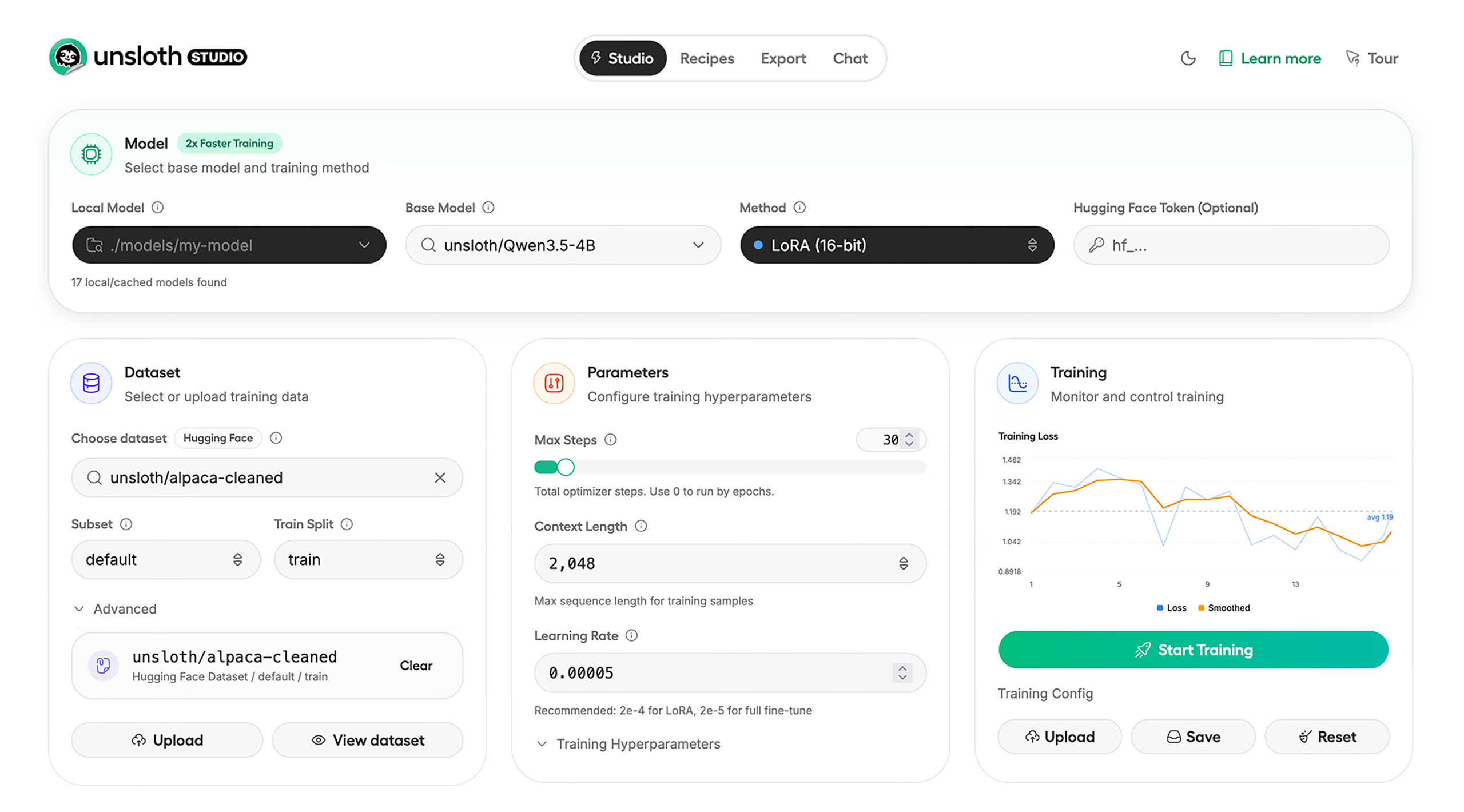
Unsloth Studio lets you run and train models for text, audio, embedding, vision and more. Available on Windows, Linux and macOS.
⭐ Features
Unsloth provides several key features for both inference and training:
Inference
- Search + download + run models including GGUF, LoRA adapters, safetensors
- Export models: Save or export models to GGUF, 16-bit safetensors and other formats.
- Tool calling: Support for self-healing tool calling and web search
- Code execution: lets LLMs run code, data and verify results so answers are more accurate.
- Auto-tune inference parameters and customize chat templates.
- Upload images, audio, PDFs, code, DOCX and more file types to chat with.
Training
- Train 500+ models up to 2x faster with up to 70% less VRAM, with no accuracy loss.
- Supports full fine-tuning, pretraining, 4-bit, 16-bit and, FP8 training.
- Observability: Monitor training live, track loss and GPU usage and customize graphs.
- Data Recipes: Auto-create datasets from PDF, CSV, DOCX etc. Edit data in a visual-node workflow.
- Reinforcement Learning: The most efficient RL library, using 80% less VRAM for GRPO, FP8 etc.
- Multi-GPU training is supported, with major improvements coming soon.
⚡ Quickstart
Unsloth can be used in two ways: through Unsloth Studio, the web UI, or through Unsloth Core, the code-based version. Each has different requirements.
Unsloth Studio (web UI)
Unsloth Studio works on Windows, Linux, WSL and macOS.
- CPU: Supported for chat inference only
- NVIDIA: Training works on RTX 30/40/50, Blackwell, DGX Spark, Station and more
- macOS: Currently supports chat only; MLX training is coming very soon
- AMD: Chat works. Train with Unsloth Core. Studio support is coming soon.
- Coming soon: Training support for Apple MLX, AMD, and Intel.
- Multi-GPU: Available now, with a major upgrade on the way
MacOS, Linux or WSL Setup (One time):
pip install -U pip uv
uv venv unsloth_studio
source unsloth_studio/bin/activate
uv pip install unsloth --torch-backend=auto
unsloth studio setup
unsloth studio -H 0.0.0.0 -p 8888
Then to launch every time:
source unsloth_studio/bin/activate
unsloth studio -H 0.0.0.0 -p 8888
Windows PowerShell (One time):
pip install -U pip uv
uv venv unsloth_studio
.\unsloth_studio\Scripts\activate
uv pip install unsloth --torch-backend=auto
unsloth studio setup
unsloth studio -H 0.0.0.0 -p 8888
Then to launch every time:
.\unsloth_studio\Scripts\activate
unsloth studio -H 0.0.0.0 -p 8888
Use our Docker image unsloth/unsloth container. Read our Docker Guide.
Nightly Installation - MacOS, Linux or WSL Setup (One time):
pip install -U pip uv
git clone --filter=blob:none https://github.com/unslothai/unsloth.git unsloth_studio
cd unsloth_studio
uv venv
source .venv/bin/activate
uv pip install -e . --torch-backend=auto
unsloth studio setup
unsloth studio -H 0.0.0.0 -p 8888
Then to launch every time:
cd unsloth_studio
source .venv/bin/activate
unsloth studio -H 0.0.0.0 -p 8888
Nightly Installation - Windows Powershell (One time):
pip install -U pip uv
git clone --filter=blob:none https://github.com/unslothai/unsloth.git unsloth_studio
cd unsloth_studio
uv venv
.\.venv\Scripts\activate
uv pip install -e . --torch-backend=auto
unsloth studio setup
unsloth studio -H 0.0.0.0 -p 8888
Then to launch every time:
cd unsloth_studio
.\.venv\Scripts\activate
unsloth studio -H 0.0.0.0 -p 8888
Unsloth Core (code-based)
Linux, WSL
pip install -U pip uv
uv venv unsloth_env
source unsloth_env/bin/activate
uv pip install unsloth --torch-backend=auto
Windows Powershell
pip install -U pip uv
uv venv unsloth_env
.\unsloth_env\Scripts\activate
uv pip install unsloth --torch-backend=auto
For Windows, pip install unsloth works only if you have Pytorch installed. Read our Windows Guide.
You can use the same Docker image as Unsloth Studio.
AMD, Intel
For RTX 50x, B200, 6000 GPUs: uv pip install unsloth --torch-backend=auto. Read our guides for: Blackwell and DGX Spark.
To install Unsloth on AMD and Intel GPUs, follow our AMD Guide and Intel Guide.
✨ Free Notebooks
Train for free with our notebooks. Read our guide. Add dataset, run, then deploy your trained model.
| Model | Free Notebooks | Performance | Memory use |
|---|---|---|---|
| Qwen3.5 (4B) | ▶️ Start for free | 1.5x faster | 60% less |
| gpt-oss (20B) | ▶️ Start for free | 2x faster | 70% less |
| gpt-oss (20B): GRPO | ▶️ Start for free | 2x faster | 80% less |
| Qwen3: Advanced GRPO | ▶️ Start for free | 2x faster | 50% less |
| Gemma 3 (4B) Vision | ▶️ Start for free | 1.7x faster | 60% less |
| embeddinggemma (300M) | ▶️ Start for free | 2x faster | 20% less |
| Mistral Ministral 3 (3B) | ▶️ Start for free | 1.5x faster | 60% less |
| Llama 3.1 (8B) Alpaca | ▶️ Start for free | 2x faster | 70% less |
| Llama 3.2 Conversational | ▶️ Start for free | 2x faster | 70% less |
| Orpheus-TTS (3B) | ▶️ Start for free | 1.5x faster | 50% less |
- See all our notebooks for: Kaggle, GRPO, TTS, embedding & Vision
- See all our models and all our notebooks
- See detailed documentation for Unsloth here
🦥 Unsloth News
- Introducing Unsloth Studio: our new web UI for running and training LLMs. Blog
- Qwen3.5 - 0.8B, 2B, 4B, 9B, 27B, 35-A3B, 112B-A10B are now supported. Guide + notebooks
- Train MoE LLMs 12x faster with 35% less VRAM - DeepSeek, GLM, Qwen and gpt-oss. Blog
- Embedding models: Unsloth now supports ~1.8-3.3x faster embedding fine-tuning. Blog • Notebooks
- New 7x longer context RL vs. all other setups, via our new batching algorithms. Blog
- New RoPE & MLP Triton Kernels & Padding Free + Packing: 3x faster training & 30% less VRAM. Blog
- 500K Context: Training a 20B model with >500K context is now possible on an 80GB GPU. Blog
- FP8 & Vision RL: You can now do FP8 & VLM GRPO on consumer GPUs. FP8 Blog • Vision RL
- gpt-oss by OpenAI: Read our RL blog, Flex Attention blog and Guide.
🔗 Links and Resources
| Type | Links |
|---|---|
 r/unsloth Reddit r/unsloth Reddit |
Join Reddit community |
| 📚 Documentation & Wiki | Read Our Docs |
_logo_late_2025.svg) Twitter (aka X) Twitter (aka X) |
Follow us on X |
| 💾 Installation | Pip & Docker Install |
| 🔮 Our Models | Unsloth Catalog |
| ✍️ Blog | Read our Blogs |
Citation
You can cite the Unsloth repo as follows:
@software{unsloth,
  author = {Daniel Han, Michael Han and Unsloth team},
  title = {Unsloth},
  url = {https://github.com/unslothai/unsloth},
  year = {2023}
}
If you trained a model with 🦥Unsloth, you can use this cool sticker!
License
Unsloth uses a dual-licensing model of Apache 2.0 and AGPL-3.0. The core Unsloth package remains licensed under Apache 2.0, while certain optional components, such as the Unsloth Studio UI are licensed under the open-source license AGPL-3.0.
This structure helps support ongoing Unsloth development while keeping the project open source and enabling the broader ecosystem to continue growing.
Thank You to
- The llama.cpp library that lets users run and save models with Unsloth
- The Hugging Face team and their libraries: transformers and TRL
- The Pytorch and Torch AO team for their contributions
- And of course for every single person who has contributed or has used Unsloth!