- Python 71.5%
- TypeScript 22.7%
- Shell 1.9%
- PowerShell 1.6%
- Rust 1.5%
- Other 0.7%
 9a8b622306
* Simplify tool-call dedup: drop hashlib, inline helpers The duplicate tool-call detector only compares calls within a single request from the same JSON parser, so dict key order is guaranteed identical for identical calls (Python 3.7+ insertion-ordered dicts). - Replace hashlib.md5(json.dumps(...)) with name + str(args) - Inline _tool_call_key, _is_duplicate_call, _record_tool_call since each was a one-liner used once - Remove unused hashlib import * Remove tool_calling_benchmark_results.md from repo * Replace html2text with builtin HTML-to-Markdown converter Drop the external html2text (GPL-3.0) dependency and its regex fallback. Add _html_to_md.py (~190 lines, stdlib only) using html.parser.HTMLParser that handles headings, links, bold/italic, lists, tables, blockquotes, code blocks, and entity decoding. Strips script/style/head tags entirely. * [pre-commit.ci] auto fixes from pre-commit.com hooks for more information, see https://pre-commit.ci * Use json.dumps(sort_keys=True) for tool-call dedup key str(dict) is sensitive to insertion order, so semantically identical calls with different key ordering would bypass duplicate detection. Switch to json.dumps with sort_keys=True for a canonical representation. * [pre-commit.ci] auto fixes from pre-commit.com hooks for more information, see https://pre-commit.ci * Revert dedup key to str(arguments) json.dumps(sort_keys=True) is unnecessary here -- the arguments dict always comes from the same JSON parser within a single request, so key insertion order is deterministic (Python 3.7+). str() is faster and sufficient for consecutive-call dedup. * Address review comments on _html_to_md.py - Remove "hr" from _BLOCK_TAGS so the dedicated hr handler is reachable - Prefix all newlines with ">" inside blockquotes (multi-line support) - Emit full  for images instead of alt text only - Replace newlines with spaces inside table cells - Track header cells per-row (_row_has_th) instead of last-cell-only - Strip trailing tabs in addition to spaces in cleanup regex * Fix blockquote rendering, truncated-HTML buffer flush, and dedup key canonicalization _html_to_md.py: - Rewrite blockquote handling with stack-based buffer approach so nested blockquotes, pre blocks inside blockquotes, and multi-paragraph quotes all render correctly with proper "> " prefix on every line. - Add flush_pending() to recover content from truncated HTML where closing tags are missing (common when _fetch_page_text caps the download size). Flushes open <a>, <td>, <pre>, and blockquote buffers. - Skip <img> tags to match prior html2text ignore_images=True behavior and avoid data-URI amplification consuming the output budget. - Collapse all whitespace (including newlines) in non-pre content per standard HTML whitespace rules: \s+ -> single space. - Escape pipe characters in table cell content to prevent column breakage. - Emit separator row after the first row for tables without <th> headers. - Guard against IndexError on _ol_counter for orphan <li> elements. - Normalize CRLF line endings before parsing. llama_cpp.py: - Restore canonical dedup key with json.dumps(sort_keys=True) so that semantically identical tool calls with different JSON key order are correctly detected as duplicates. * [pre-commit.ci] auto fixes from pre-commit.com hooks for more information, see https://pre-commit.ci * Fix table optional end tags, inline code whitespace, and link text normalization _html_to_md.py: - Extract _finish_cell() and _finish_row() helpers to handle HTML tables that omit optional </td>, </th>, or </tr> end tags. This is valid HTML and common on real web pages -- previously the parser would silently drop earlier cells and entire rows. - Call _finish_cell()/_finish_row() from handle_starttag for <tr>/<td>/<th>, handle_endtag for </tr>/<td>/<th>/<table>, and flush_pending() so all three paths (normal close, implicit close, truncated HTML) use the same row-finalization logic including header separator emission. - Add _in_inline_code flag so handle_data() preserves literal whitespace inside <code> spans instead of collapsing it. Source like <code>pip install unsloth</code> now correctly renders as `pip install unsloth` rather than `pip install unsloth`. - Extract _finish_link() helper that normalizes accumulated link text with \s+ -> single space before building the Markdown link. Prevents block- level content inside <a> tags (e.g. <a><div>one</div><div>two</div></a>) from producing multiline [one\n\ntwo](href) link labels. - Empty blockquotes now produce no output instead of a stray ">". - Remove unused _bq_depth field (all routing uses _bq_stack). - Flush open cells and rows in handle_endtag("table") for robustness. * Support <ol start=N>, <dl>/<dt>/<dd>, and preserve code block whitespace _html_to_md.py: - Honor <ol start="N"> attribute so ordered lists preserve their original numbering instead of always restarting from 1. Important for docs/tutorials that continue numbering across sections. - Add dl, dt, dd to _BLOCK_TAGS so definition lists (common on MDN, Python docs, Django docs) produce separated text instead of concatenated blobs. - Rewrite _cleanup() to be fence-aware: content inside fenced code blocks is now preserved verbatim (intentional blank lines in <pre> content are no longer collapsed). Outside code blocks, blank runs are limited to one and trailing whitespace is stripped. - Fix _prefix_blockquote() to strip trailing whitespace before collapsing blank lines, preventing the "\n\n \n\n" pattern from sneaking through. * Suppress whitespace-only text nodes between table structural elements Indented HTML tables (nearly all real-world pages) produce whitespace text nodes between <table>, <tr>, </tr> etc. that land in the output as leading spaces before table rows, breaking Markdown table alignment. Skip whitespace-only text nodes when inside a table but not inside a cell, so indentation from source HTML does not leak into the output. * Revert dedup key to str(arguments) with explanatory comment json.dumps(sort_keys=True) is unnecessary overhead here: arguments always comes from json.loads on model output within a single request, so dict insertion order is deterministic in Python 3.7+. A repeated call from the model produces the same JSON, which parses to the same dict repr. str() avoids re-serialization on every tool call. --------- Co-authored-by: pre-commit-ci[bot] <66853113+pre-commit-ci[bot]@users.noreply.github.com> |
||
|---|---|---|
| .github | ||
| images | ||
| scripts | ||
| studio | ||
| tests | ||
| unsloth | ||
| unsloth_cli | ||
| .gitattributes | ||
| .gitignore | ||
| .pre-commit-ci.yaml | ||
| .pre-commit-config.yaml | ||
| build.sh | ||
| cli.py | ||
| CODE_OF_CONDUCT.md | ||
| CONTRIBUTING.md | ||
| COPYING | ||
| install.ps1 | ||
| install.sh | ||
| LICENSE | ||
| pyproject.toml | ||
| README.md | ||
| unsloth-cli.py | ||

Run and train AI models with a unified local interface.
Features • Quickstart • Notebooks • Documentation • Reddit
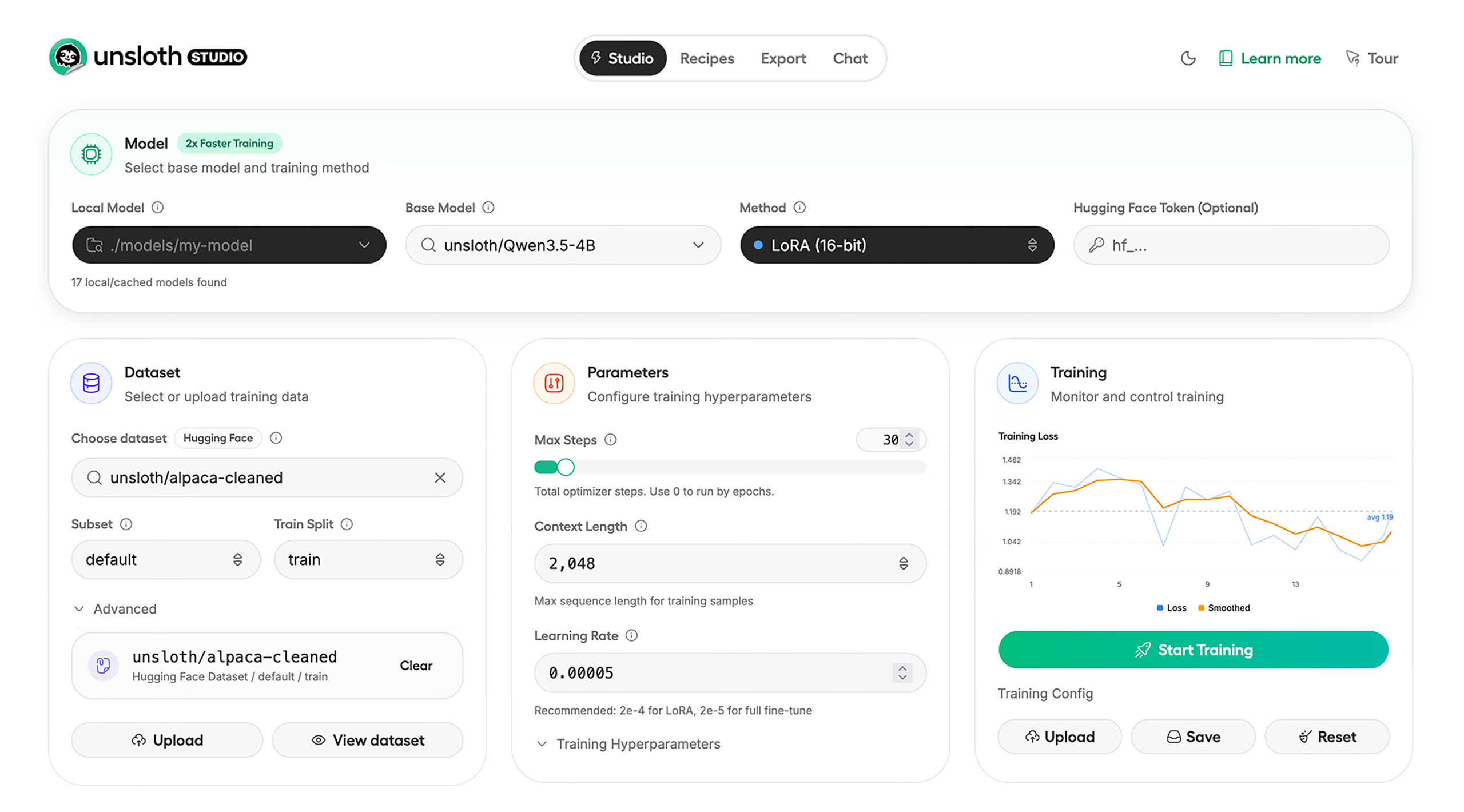
Unsloth Studio (Beta) lets you run and train text, audio, embedding, vision models on Windows, Linux and macOS.
⭐ Features
Unsloth provides several key features for both inference and training:
Inference
- Search + download + run models including GGUF, LoRA adapters, safetensors
- Export models: Save or export models to GGUF, 16-bit safetensors and other formats.
- Tool calling: Support for self-healing tool calling and web search
- Code execution: lets LLMs test code in Claude artifacts and sandbox environments
- Auto-tune inference parameters and customize chat templates.
- We work directly with teams behind gpt-oss, Qwen3, Llama 4, Mistral, Gemma 1-3, and Phi-4, where we’ve fixed bugs that improve model accuracy.
- Upload images, audio, PDFs, code, DOCX and more file types to chat with.
Training
- Train and RL 500+ models up to 2x faster with up to 70% less VRAM, with no accuracy loss.
- Custom Triton and mathematical kernels. See some collabs we did with PyTorch and Hugging Face.
- Data Recipes: Auto-create datasets from PDF, CSV, DOCX etc. Edit data in a visual-node workflow.
- Reinforcement Learning (RL): The most efficient RL library, using 80% less VRAM for GRPO, FP8 etc.
- Supports full fine-tuning, RL, pretraining, 4-bit, 16-bit and, FP8 training.
- Observability: Monitor training live, track loss and GPU usage and customize graphs.
- Multi-GPU training is supported, with major improvements coming soon.
⚡ Quickstart
Unsloth can be used in two ways: through Unsloth Studio, the web UI, or through Unsloth Core, the code-based version. Each has different requirements.
Unsloth Studio (web UI)
Unsloth Studio (Beta) works on Windows, Linux, WSL and macOS.
- CPU: Supported for Chat and Data Recipes currently
- NVIDIA: Training works on RTX 30/40/50, Blackwell, DGX Spark, Station and more
- macOS: Currently supports chat and Data Recipes. MLX training is coming very soon
- AMD: Chat + Data works. Train with Unsloth Core. Studio support is out soon.
- Coming soon: Training support for Apple MLX, AMD, and Intel.
- Multi-GPU: Available now, with a major upgrade on the way
macOS, Linux, WSL:
curl -fsSL https://unsloth.ai/install.sh | sh
Windows:
irm https://unsloth.ai/install.ps1 | iex
Launch
unsloth studio -H 0.0.0.0 -p 8888
Update
To update, use the same install commands as above. Or run (does not work on Windows):
unsloth studio update
Docker
Use our Docker image unsloth/unsloth container. Run:
docker run -d -e JUPYTER_PASSWORD="mypassword" \
  -p 8888:8888 -p 8000:8000 -p 2222:22 \
  -v $(pwd)/work:/workspace/work \
  --gpus all \
  unsloth/unsloth
Developer, Nightly, Uninstall
To see developer, nightly and uninstallation etc. instructions, see advanced installation.
Unsloth Core (code-based)
Linux, WSL:
curl -LsSf https://astral.sh/uv/install.sh | sh
uv venv unsloth_env --python 3.13
source unsloth_env/bin/activate
uv pip install unsloth --torch-backend=auto
Windows:
winget install -e --id Python.Python.3.13
winget install --id=astral-sh.uv  -e
uv venv unsloth_env --python 3.13
.\unsloth_env\Scripts\activate
uv pip install unsloth --torch-backend=auto
For Windows, pip install unsloth works only if you have PyTorch installed. Read our Windows Guide.
You can use the same Docker image as Unsloth Studio.
AMD, Intel:
For RTX 50x, B200, 6000 GPUs: uv pip install unsloth --torch-backend=auto. Read our guides for: Blackwell and DGX Spark.
To install Unsloth on AMD and Intel GPUs, follow our AMD Guide and Intel Guide.
✨ Free Notebooks
Train for free with our notebooks. Read our guide. Add dataset, run, then deploy your trained model.
| Model | Free Notebooks | Performance | Memory use |
|---|---|---|---|
| Qwen3.5 (4B) | ▶️ Start for free | 1.5x faster | 60% less |
| gpt-oss (20B) | ▶️ Start for free | 2x faster | 70% less |
| Qwen3.5 GSPO | ▶️ Start for free | 2x faster | 70% less |
| gpt-oss (20B): GRPO | ▶️ Start for free | 2x faster | 80% less |
| Qwen3: Advanced GRPO | ▶️ Start for free | 2x faster | 70% less |
| Gemma 3 (4B) Vision | ▶️ Start for free | 1.7x faster | 60% less |
| embeddinggemma (300M) | ▶️ Start for free | 2x faster | 20% less |
| Mistral Ministral 3 (3B) | ▶️ Start for free | 1.5x faster | 60% less |
| Llama 3.1 (8B) Alpaca | ▶️ Start for free | 2x faster | 70% less |
| Llama 3.2 Conversational | ▶️ Start for free | 2x faster | 70% less |
| Orpheus-TTS (3B) | ▶️ Start for free | 1.5x faster | 50% less |
- See all our notebooks for: Kaggle, GRPO, TTS, embedding & Vision
- See all our models and all our notebooks
- See detailed documentation for Unsloth here
🦥 Unsloth News
- Introducing Unsloth Studio: our new web UI for running and training LLMs. Blog
- Qwen3.5 - 0.8B, 2B, 4B, 9B, 27B, 35-A3B, 112B-A10B are now supported. Guide + notebooks
- Train MoE LLMs 12x faster with 35% less VRAM - DeepSeek, GLM, Qwen and gpt-oss. Blog
- Embedding models: Unsloth now supports ~1.8-3.3x faster embedding fine-tuning. Blog • Notebooks
- New 7x longer context RL vs. all other setups, via our new batching algorithms. Blog
- New RoPE & MLP Triton Kernels & Padding Free + Packing: 3x faster training & 30% less VRAM. Blog
- 500K Context: Training a 20B model with >500K context is now possible on an 80GB GPU. Blog
- FP8 & Vision RL: You can now do FP8 & VLM GRPO on consumer GPUs. FP8 Blog • Vision RL
- gpt-oss by OpenAI: Read our RL blog, Flex Attention blog and Guide.
📥 Advanced Installation
The below advanced instructions are for Unsloth Studio. For Unsloth Core advanced installation, view our docs.
Developer installs: macOS, Linux, WSL:
git clone https://github.com/unslothai/unsloth
cd unsloth
./install.sh --local
unsloth studio -H 0.0.0.0 -p 8888
Then to update :
unsloth studio update
Developer installs: Windows PowerShell:
git clone https://github.com/unslothai/unsloth.git
cd unsloth
Set-ExecutionPolicy -Scope Process -ExecutionPolicy Bypass
.\install.ps1 --local
unsloth studio -H 0.0.0.0 -p 8888
Then to update :
unsloth studio update
Nightly: MacOS, Linux, WSL:
git clone https://github.com/unslothai/unsloth
cd unsloth
git checkout nightly
./install.sh --local
unsloth studio -H 0.0.0.0 -p 8888
Then to launch every time:
unsloth studio -H 0.0.0.0 -p 8888
Nightly: Windows:
Run in Windows Powershell:
git clone https://github.com/unslothai/unsloth.git
cd unsloth
git checkout nightly
Set-ExecutionPolicy -Scope Process -ExecutionPolicy Bypass
.\install.ps1 --local
unsloth studio -H 0.0.0.0 -p 8888
Then to launch every time:
unsloth studio -H 0.0.0.0 -p 8888
Uninstall
You can uninstall Unsloth Studio by deleting its install folder usually located under $HOME/.unsloth/studio on Mac/Linux/WSL and %USERPROFILE%\.unsloth\studio on Windows. Using the rm -rf commands will delete everything, including your history, cache:
- MacOS, WSL, Linux:
rm -rf ~/.unsloth/studio - Windows (PowerShell):
Remove-Item -Recurse -Force "$HOME\.unsloth\studio"
For more info, see our docs.
Deleting model files
You can delete old model files either from the bin icon in model search or by removing the relevant cached model folder from the default Hugging Face cache directory. By default, HF uses:
- MacOS, Linux, WSL:
~/.cache/huggingface/hub/ - Windows:
%USERPROFILE%\.cache\huggingface\hub\
💚 Community and Links
| Type | Links |
|---|---|
 Discord Discord |
Join Discord server |
 r/unsloth Reddit r/unsloth Reddit |
Join Reddit community |
| 📚 Documentation & Wiki | Read Our Docs |
_logo_late_2025.svg) Twitter (aka X) Twitter (aka X) |
Follow us on X |
| 🔮 Our Models | Unsloth Catalog |
| ✍️ Blog | Read our Blogs |
Citation
You can cite the Unsloth repo as follows:
@software{unsloth,
  author = {Daniel Han, Michael Han and Unsloth team},
  title = {Unsloth},
  url = {https://github.com/unslothai/unsloth},
  year = {2023}
}
If you trained a model with 🦥Unsloth, you can use this cool sticker!
License
Unsloth uses a dual-licensing model of Apache 2.0 and AGPL-3.0. The core Unsloth package remains licensed under Apache 2.0, while certain optional components, such as the Unsloth Studio UI are licensed under the open-source license AGPL-3.0.
This structure helps support ongoing Unsloth development while keeping the project open source and enabling the broader ecosystem to continue growing.
Thank You to
- The llama.cpp library that lets users run and save models with Unsloth
- The Hugging Face team and their libraries: transformers and TRL
- The Pytorch and Torch AO team for their contributions
- NVIDIA for their NeMo DataDesigner library and their contributions
- And of course for every single person who has contributed or has used Unsloth!