- Python 71.5%
- TypeScript 22.7%
- Shell 1.9%
- PowerShell 1.6%
- Rust 1.5%
- Other 0.7%
 6f129a214b
* One liner setup for unsloth studio * Fix install scripts: system deps, activation bugs, curl/wget support - install.sh: detect platform (macOS/Linux/WSL) and check for missing system dependencies (cmake, git, build-essential, libcurl4-openssl-dev). Prompt user once for permission to install all missing packages via brew (macOS) or sudo apt-get (Linux/WSL). Add wget fallback via download() helper since curl is not always present on minimal Linux installs. Fix nested curl|sh stdin stealing by downloading uv installer to a tempfile first. Replace venv activation (no-op in a pipe subshell) with explicit --python flag for uv pip install and direct venv binary invocation. Add idempotency guard for venv creation. Redirect stdin on unsloth studio setup to prevent pipe consumption. On macOS, check for Xcode Command Line Tools and trigger install if missing. - install.ps1: wrap script body in Install-UnslothStudio function so that errors use return instead of exit (exit kills the terminal when run via irm|iex). Remove activate.ps1 invocation entirely -- use explicit --python path for uv pip install and & $UnslothExe for studio setup. This avoids both the child-scope activation bug (& vs dot-source) and the execution policy error on default Windows systems. Add winget availability check with clear error message. Fix PATH refresh to append registry paths instead of replacing the session PATH. Add uv installer fallback via astral.sh PowerShell script if winget install does not put uv on PATH. Broaden Python version check to accept 3.11-3.13. Add idempotency guard for venv creation. - README.md: add wget one-liner alternative for systems without curl. * Fix Tailwind CSS v4 .gitignore bug on Windows (#4444) - Add .gitignore hiding workaround to setup.ps1 (matching existing setup.sh logic) so venv .gitignore files containing "*" don't prevent Tailwind's oxide scanner from finding .tsx source files - Add CSS size validation to setup.sh, setup.ps1, and build.sh to catch truncated Tailwind builds early - Remove stray force-rebuild overrides that made the "skip build if current" cache check dead code in both setup scripts - Add rm -rf dist to build.sh to force clean rebuilds for wheel packaging * Change default port 8000 to 8888, fix installer bugs, improve UX - Change default Studio port from 8000 to 8888 across all entry points (run.py, studio.py, ui.py, colab.py, vite.config.ts, setup scripts) - Update launch banner: "Launching with studio venv..." to "Launching Unsloth Studio... Please wait..." - Add "Open your web browser" banner and rename labels (Local -> Local Access, External -> Worldwide Web Address) - Fix venv idempotency: check for bin/python instead of just directory existence, clean up partial venvs on retry - Fix build.sh CSS validation: handle empty CSS case that silently bypassed the check with "integer expression expected" - Fix install.sh sudo handling: try apt-get without sudo first (works when root), then escalate with per-package tracking and user prompt - Fix install.ps1: check exit code from studio setup, fail on error - Add pciutils to WSL GGUF build dependencies - Apply same smart apt-get escalation pattern to studio/setup.sh * Use detected Python version for venv, abort on non-apt Linux - install.ps1: detect existing Python 3.11/3.12/3.13 and use that version for venv creation instead of always forcing 3.13 - install.sh: exit with error on non-apt Linux distros when required packages cannot be auto-installed, instead of silently continuing * Make sudo permission prompt more prominent with warning banner * Add Accept [Y/n] sudo prompt to studio/setup.sh for consistency * Fix native command exit code handling and sudo decline flow install.ps1: Add $LASTEXITCODE checks after winget (Python), uv venv, and uv pip install calls. $ErrorActionPreference only catches PowerShell cmdlet errors, not native executable failures. The Python check also handles winget returning non-zero for "already installed". setup.sh: Skip llama-server build when user declines sudo or sudo is unavailable. Previously the script continued to section 8 which would fail with confusing errors (e.g. "gcc: command not found") since build-essential was never installed. * Move rm -rf llama.cpp inside build branch to preserve existing install When _SKIP_GGUF_BUILD is set (user declined sudo or sudo unavailable), the previous rm -rf would destroy an already-working llama-server before the skip check ran. Move it inside the else branch so existing builds are preserved when the rebuild is skipped. --------- Co-authored-by: Daniel Han <danielhanchen@users.noreply.github.com> Co-authored-by: Daniel Han <danielhanchen@gmail.com> |
||
|---|---|---|
| .github | ||
| images | ||
| scripts | ||
| studio | ||
| tests | ||
| unsloth | ||
| unsloth_cli | ||
| .gitattributes | ||
| .gitignore | ||
| .pre-commit-ci.yaml | ||
| .pre-commit-config.yaml | ||
| build.sh | ||
| cli.py | ||
| CODE_OF_CONDUCT.md | ||
| CONTRIBUTING.md | ||
| COPYING | ||
| install.ps1 | ||
| install.sh | ||
| LICENSE | ||
| pyproject.toml | ||
| README.md | ||
| unsloth-cli.py | ||

Run and train AI models with a unified local interface.
Features • Quickstart • Notebooks • Documentation • Discord
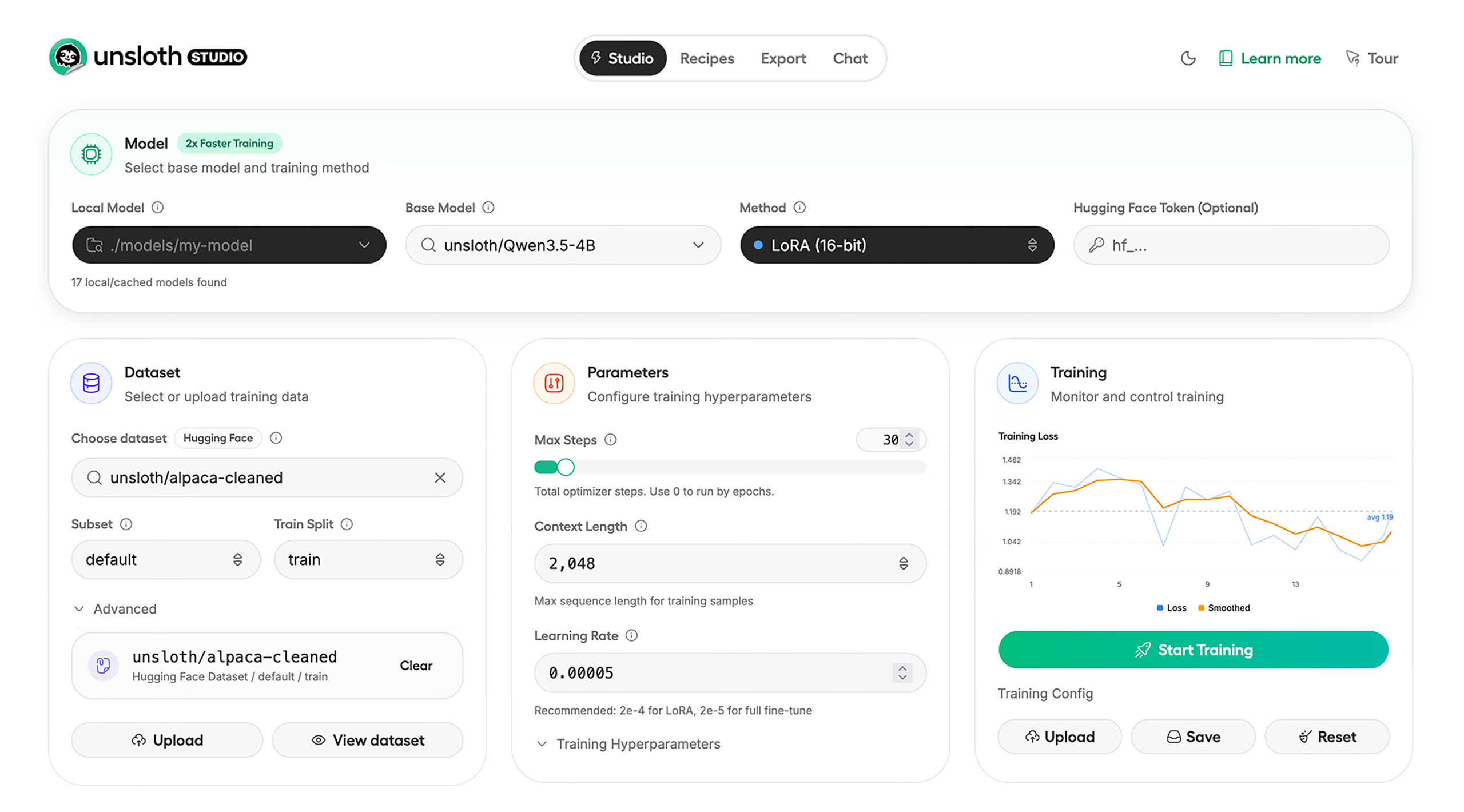
Unsloth Studio (Beta) lets you run and train text, audio, embedding, vision models on Windows, Linux and macOS.
⭐ Features
Unsloth provides several key features for both inference and training:
Inference
- Search + download + run models including GGUF, LoRA adapters, safetensors
- Export models: Save or export models to GGUF, 16-bit safetensors and other formats.
- Tool calling: Support for self-healing tool calling and web search
- Code execution: lets LLMs run code, data and verify results so answers are more accurate.
- Auto-tune inference parameters and customize chat templates.
- Upload images, audio, PDFs, code, DOCX and more file types to chat with.
Training
- Train 500+ models up to 2x faster with up to 70% less VRAM, with no accuracy loss.
- Supports full fine-tuning, pretraining, 4-bit, 16-bit and, FP8 training.
- Observability: Monitor training live, track loss and GPU usage and customize graphs.
- Data Recipes: Auto-create datasets from PDF, CSV, DOCX etc. Edit data in a visual-node workflow.
- Reinforcement Learning: The most efficient RL library, using 80% less VRAM for GRPO, FP8 etc.
- Multi-GPU training is supported, with major improvements coming soon.
⚡ Quickstart
Unsloth can be used in two ways: through Unsloth Studio, the web UI, or through Unsloth Core, the code-based version. Each has different requirements.
Unsloth Studio (web UI)
Unsloth Studio (Beta) works on Windows, Linux, WSL and macOS.
- CPU: Supported for chat inference only
- NVIDIA: Training works on RTX 30/40/50, Blackwell, DGX Spark, Station and more
- macOS: Currently supports chat only; MLX training is coming very soon
- AMD: Chat works. Train with Unsloth Core. Studio support is coming soon.
- Coming soon: Training support for Apple MLX, AMD, and Intel.
- Multi-GPU: Available now, with a major upgrade on the way
MacOS, Linux, WSL:
For MacOS, ensure you have cmake installed. If not, run brew install cmake.
curl -fsSL https://raw.githubusercontent.com/unslothai/unsloth/main/install.sh | sh
If you don't have curl, use wget:
wget -qO- https://raw.githubusercontent.com/unslothai/unsloth/main/install.sh | sh
Or manually:
curl -LsSf https://astral.sh/uv/install.sh | sh
uv venv unsloth_studio --python 3.13
source unsloth_studio/bin/activate
uv pip install unsloth --torch-backend=auto
unsloth studio setup
unsloth studio -H 0.0.0.0 -p 8888
Then to launch every time:
source unsloth_studio/bin/activate
unsloth studio -H 0.0.0.0 -p 8888
Windows PowerShell (One time):
irm https://raw.githubusercontent.com/unslothai/unsloth/main/install.ps1 | iex
Or manually:
winget install -e --id Python.Python.3.13
winget install --id=astral-sh.uv  -e
uv venv unsloth_studio --python 3.13
.\unsloth_studio\Scripts\activate
uv pip install unsloth --torch-backend=auto
unsloth studio setup
unsloth studio -H 0.0.0.0 -p 8888
Then to launch every time:
.\unsloth_studio\Scripts\activate
unsloth studio -H 0.0.0.0 -p 8888
Docker
Use our Docker image unsloth/unsloth container. Run:
docker run -d -e JUPYTER_PASSWORD="mypassword" \
  -p 8888:8888 -p 8000:8000 -p 2222:22 \
  -v $(pwd)/work:/workspace/work \
  --gpus all \
  unsloth/unsloth
Nightly Install - MacOS, Linux, WSL:
curl -LsSf https://astral.sh/uv/install.sh | sh
git clone --filter=blob:none https://github.com/unslothai/unsloth.git unsloth_studio
cd unsloth_studio
uv venv --python 3.13
source .venv/bin/activate
uv pip install -e . --torch-backend=auto
unsloth studio setup
unsloth studio -H 0.0.0.0 -p 8888
Then to launch every time:
cd unsloth_studio
source .venv/bin/activate
unsloth studio -H 0.0.0.0 -p 8888
Nightly Install - Windows:
Run in Windows Powershell:
winget install -e --id Python.Python.3.13
winget install --id=astral-sh.uv  -e
git clone --filter=blob:none https://github.com/unslothai/unsloth.git unsloth_studio
cd unsloth_studio
uv venv --python 3.13
.\.venv\Scripts\activate
uv pip install -e . --torch-backend=auto
unsloth studio setup
unsloth studio -H 0.0.0.0 -p 8888
Then to launch every time:
cd unsloth_studio
.\.venv\Scripts\activate
unsloth studio -H 0.0.0.0 -p 8888
Unsloth Core (code-based)
Linux, WSL
curl -LsSf https://astral.sh/uv/install.sh | sh
uv venv unsloth_env --python 3.13
source unsloth_env/bin/activate
uv pip install unsloth --torch-backend=auto
Windows Powershell
winget install -e --id Python.Python.3.13
winget install --id=astral-sh.uv  -e
uv venv unsloth_env --python 3.13
.\unsloth_env\Scripts\activate
uv pip install unsloth --torch-backend=auto
For Windows, pip install unsloth works only if you have Pytorch installed. Read our Windows Guide.
You can use the same Docker image as Unsloth Studio.
AMD, Intel
For RTX 50x, B200, 6000 GPUs: uv pip install unsloth --torch-backend=auto. Read our guides for: Blackwell and DGX Spark.
To install Unsloth on AMD and Intel GPUs, follow our AMD Guide and Intel Guide.
✨ Free Notebooks
Train for free with our notebooks. Read our guide. Add dataset, run, then deploy your trained model.
| Model | Free Notebooks | Performance | Memory use |
|---|---|---|---|
| Qwen3.5 (4B) | ▶️ Start for free | 1.5x faster | 60% less |
| gpt-oss (20B) | ▶️ Start for free | 2x faster | 70% less |
| gpt-oss (20B): GRPO | ▶️ Start for free | 2x faster | 80% less |
| Qwen3: Advanced GRPO | ▶️ Start for free | 2x faster | 50% less |
| Gemma 3 (4B) Vision | ▶️ Start for free | 1.7x faster | 60% less |
| embeddinggemma (300M) | ▶️ Start for free | 2x faster | 20% less |
| Mistral Ministral 3 (3B) | ▶️ Start for free | 1.5x faster | 60% less |
| Llama 3.1 (8B) Alpaca | ▶️ Start for free | 2x faster | 70% less |
| Llama 3.2 Conversational | ▶️ Start for free | 2x faster | 70% less |
| Orpheus-TTS (3B) | ▶️ Start for free | 1.5x faster | 50% less |
- See all our notebooks for: Kaggle, GRPO, TTS, embedding & Vision
- See all our models and all our notebooks
- See detailed documentation for Unsloth here
🦥 Unsloth News
- Introducing Unsloth Studio: our new web UI for running and training LLMs. Blog
- Qwen3.5 - 0.8B, 2B, 4B, 9B, 27B, 35-A3B, 112B-A10B are now supported. Guide + notebooks
- Train MoE LLMs 12x faster with 35% less VRAM - DeepSeek, GLM, Qwen and gpt-oss. Blog
- Embedding models: Unsloth now supports ~1.8-3.3x faster embedding fine-tuning. Blog • Notebooks
- New 7x longer context RL vs. all other setups, via our new batching algorithms. Blog
- New RoPE & MLP Triton Kernels & Padding Free + Packing: 3x faster training & 30% less VRAM. Blog
- 500K Context: Training a 20B model with >500K context is now possible on an 80GB GPU. Blog
- FP8 & Vision RL: You can now do FP8 & VLM GRPO on consumer GPUs. FP8 Blog • Vision RL
- gpt-oss by OpenAI: Read our RL blog, Flex Attention blog and Guide.
🔗 Links and Resources
| Type | Links |
|---|---|
 r/unsloth Reddit r/unsloth Reddit |
Join Reddit community |
| 📚 Documentation & Wiki | Read Our Docs |
_logo_late_2025.svg) Twitter (aka X) Twitter (aka X) |
Follow us on X |
| 💾 Installation | Pip & Docker Install |
| 🔮 Our Models | Unsloth Catalog |
| ✍️ Blog | Read our Blogs |
Citation
You can cite the Unsloth repo as follows:
@software{unsloth,
  author = {Daniel Han, Michael Han and Unsloth team},
  title = {Unsloth},
  url = {https://github.com/unslothai/unsloth},
  year = {2023}
}
If you trained a model with 🦥Unsloth, you can use this cool sticker!
License
Unsloth uses a dual-licensing model of Apache 2.0 and AGPL-3.0. The core Unsloth package remains licensed under Apache 2.0, while certain optional components, such as the Unsloth Studio UI are licensed under the open-source license AGPL-3.0.
This structure helps support ongoing Unsloth development while keeping the project open source and enabling the broader ecosystem to continue growing.
Thank You to
- The llama.cpp library that lets users run and save models with Unsloth
- The Hugging Face team and their libraries: transformers and TRL
- The Pytorch and Torch AO team for their contributions
- And of course for every single person who has contributed or has used Unsloth!