- Python 71.5%
- TypeScript 22.7%
- Shell 1.9%
- PowerShell 1.6%
- Rust 1.5%
- Other 0.7%
 65b4028560
* Pin bitsandbytes to continuous-release_main on ROCm for 4-bit decode fix
bitsandbytes 0.49.2 on PyPI ships with a broken 4-bit GEMV kernel on
every ROCm target:
- CDNA (gfx90a / gfx942 / gfx950 = MI210 / MI300X / MI350) via a
broken blocksize=32/64 warp64 GEMV kernel whose tests were
explicitly skipped with ROCM_WARP_SIZE_64 guards because the
code was known broken.
- RDNA3 / RDNA3.5 (gfx1100-1103 / gfx1150-1152) via a compile-time
BNB_WARP_SIZE macro in the host-side dispatch that resolves to
64 when the multi-arch wheel is compiled with CDNA as the
primary target, so num_blocks is wrong on RDNA and half the GEMV
output is never written.
At decode shape (1, 1, hidden) both bugs produce NaN. Training is
unaffected because training shapes are (batch, seq_len > 1, hidden)
and never touch the GEMV path. The crash during autoregressive
inference surfaces as _assert_async_cuda_kernel in torch.multinomial
which on HIP becomes a hard HSA_STATUS_ERROR_EXCEPTION instead of
a clean Python error.
Both bugs are fixed by bitsandbytes commit 713a3b8 ("[ROCm] Enable
blocksize 32 4-bit quantization and GEMV kernels on AMD CDNA",
PR #1887, merged 2026-03-09) which replaces BNB_WARP_SIZE with a
runtime hipDeviceGetAttribute query and ships a working CDNA warp64
kernel. That commit has not shipped to PyPI yet, but
continuous-release_main wheels are published on every push to bnb
main via GitHub Releases.
Point the ROCm install path at the continuous-release_main x86_64 and
aarch64 wheels and fall back to PyPI >=0.49.1 when the pre-release is
unreachable (offline installs, firewalled hosts, or architectures not
covered by the pre-release wheels). Drop the pin once bnb cuts a
0.50+ tag on PyPI.
Verified on MI300X (gfx942, ROCm 7.2, torch 2.10.0+rocm7.1): direct
bnb GEMV shape test now returns 0.0078 max abs error at seq_len=1
(no NaN) vs NaN on 0.49.2, and full Unsloth + for_inference + 4-bit
sampling generation works end-to-end.
NVIDIA / CPU / Mac / Windows paths are unaffected -- the helper is
gated on the ROCm torch index and platform.machine() respectively.
* Drop Studio ROCm 16-bit fallback now that bnb 0.50+ fixes 4-bit decode
The 16-bit fallback in studio/backend/core/inference/inference.py was
added as a workaround for a bug that this PR already fixes at the
install layer: bitsandbytes <= 0.49.2 has a broken 4-bit GEMV kernel
on every ROCm target, which NaNs at decode shape (seq_len=1) and
crashes autoregressive inference. bnb PR #1887 (commit 713a3b8, in
0.50.0.dev0+, pinned by install.sh / install_python_stack.py in this
PR) restores correct 4-bit decode on MI300X and verified working
end-to-end with full Unsloth + for_inference + sampling.
Revert the dual code path so ROCm and NVIDIA both go through the
normal FastLanguageModel.from_pretrained + for_inference flow:
- Remove the conditional `from unsloth import` that skipped the
import on ROCm. The monkey-patches it was trying to avoid were
never the cause of the crash; bnb 4-bit GEMV was.
- Remove the `if _hw_module.IS_ROCM:` branch in load_model that
loaded with plain transformers + PEFT + bfloat16, and the
`_resolve_fp16_base` helper it relied on.
- Remove the `get_chat_template is not None` fallback in
_load_chat_template_info -- get_chat_template is now always
imported.
- Refactor the audio/vision ROCm guard to check _hw_module.IS_ROCM
directly instead of the removed _IS_ROCM_ENV global. Audio and
vision on ROCm still need separate validation (FastVisionModel
and the CSM audio codecs were never tested on HIP) so the guard
stays for now.
Add _bnb_rocm_4bit_ok() as a runtime safety net for users who
install from this PR before the install.sh bnb pin kicks in, or
whose installer fell back to the PyPI pin because the continuous-
release wheel was unreachable. When the installed bnb is < 0.50 on
ROCm, force load_in_4bit=False and strip any -unsloth-bnb-4bit /
-bnb-4bit suffix from the model path so a pre-quantized repo
resolves to its FP16 sibling instead of pulling bnb back in via
the repo's quantization_config. LoRA adapters whose base is a
pre-quantized repo on old bnb will still fail inside Unsloth's
loader -- the only real fix there is `unsloth studio update`.
Verified on MI300X (gfx942, ROCm 7.2, torch 2.10.0+rocm7.1):
- HAPPY path (bnb 0.50.0.dev0, load_in_4bit=True, pre-quantized
repo): loads in 4-bit via the fixed GEMV, generation returns
"Paris." for greedy and sampling.
- SAFETY-NET path (simulated old bnb, suffix-stripped to the
FP16 sibling, load_in_4bit=False): loads in bf16, generation
returns "Paris." for greedy and sampling.
Net diff is ~45 lines smaller than the pre-revert state because
the entire plain-transformers 16-bit branch is gone.
* Cache _bnb_rocm_4bit_ok() with functools.cache
load_model() can be called many times in a single session but the bnb
version and hardware state cannot change at runtime, so memoise the
check. First call is ~1.9 ms (dominated by the lazy `import bitsandbytes`
inside the try block), subsequent calls drop to sub-microsecond dict
lookups. Zero behavioral change.
* Shorten verbose bnb/ROCm comments
Comment-only cleanup across install.sh, studio/install_python_stack.py,
and studio/backend/core/inference/inference.py. No behavioral change.
* [pre-commit.ci] auto fixes from pre-commit.com hooks
for more information, see https://pre-commit.ci
* Remove _bnb_rocm_4bit_ok safety net from inference.py
Studio's ROCm support is brand new (PR #4720, merged today) and every
fresh install pulls the bnb continuous-release_main wheel via
install.sh / install_python_stack.py in this same PR. There are no
existing ROCm Studio installs carrying bnb < 0.50, so the defensive
version-check fallback is guarding against a scenario that cannot
actually occur. Delete the helper, the functools import, and the
safety-net block -- inference.py now calls FastLanguageModel.from_pretrained
directly with no ROCm branching.
* Drop audio/vision ROCm guard in inference.py — verified unblocked by bnb fix
Vision inference was blocked by the same bnb 4-bit GEMV bug that affected
text inference (vision models use bnb 4-bit for the LM backbone). With
bnb 0.50+ pinned in install.sh / install_python_stack.py, vision works
end-to-end on MI300X: Llama-3.2-11B-Vision-Instruct-unsloth-bnb-4bit
loaded in 4-bit via FastVisionModel + for_inference returns a correct
answer to a multimodal prompt.
Audio (CSM) was never actually blocked by HIP — on this hardware CSM
loads and runs its backbone forward pass fine with bnb 0.50, then fails
during generate() with a transformers-level kwarg validation mismatch
in generation_csm.py (`backbone_last_hidden_state` rejected). That's a
pre-existing transformers/CSM integration bug that reproduces identically
on NVIDIA, so the ROCm-gated guard was never actually protecting users
from anything HIP-specific.
Remove the combined audio/vision guard and the now-unused _hw_module
import. Also restore the one-word "Can be" in an inline comment that
drifted during the earlier comment-shortening pass, so the inference.py
delta vs pre-#4720 is exactly the max_seq_length<=0 crash fix and
nothing else.
* Shorten max_seq_length=0 guard comment to one line
---------
Co-authored-by: Daniel Han <danielhanchen@users.noreply.github.com>
Co-authored-by: pre-commit-ci[bot] <66853113+pre-commit-ci[bot]@users.noreply.github.com>
|
||
|---|---|---|
| .github | ||
| images | ||
| scripts | ||
| studio | ||
| tests | ||
| unsloth | ||
| unsloth_cli | ||
| .gitattributes | ||
| .gitignore | ||
| .pre-commit-ci.yaml | ||
| .pre-commit-config.yaml | ||
| build.sh | ||
| cli.py | ||
| CODE_OF_CONDUCT.md | ||
| CONTRIBUTING.md | ||
| COPYING | ||
| install.ps1 | ||
| install.sh | ||
| install_gemma4_mlx.sh | ||
| LICENSE | ||
| pyproject.toml | ||
| README.md | ||
| unsloth-cli.py | ||

Run and train AI models with a unified local interface.
Features • Quickstart • Notebooks • Documentation • Reddit
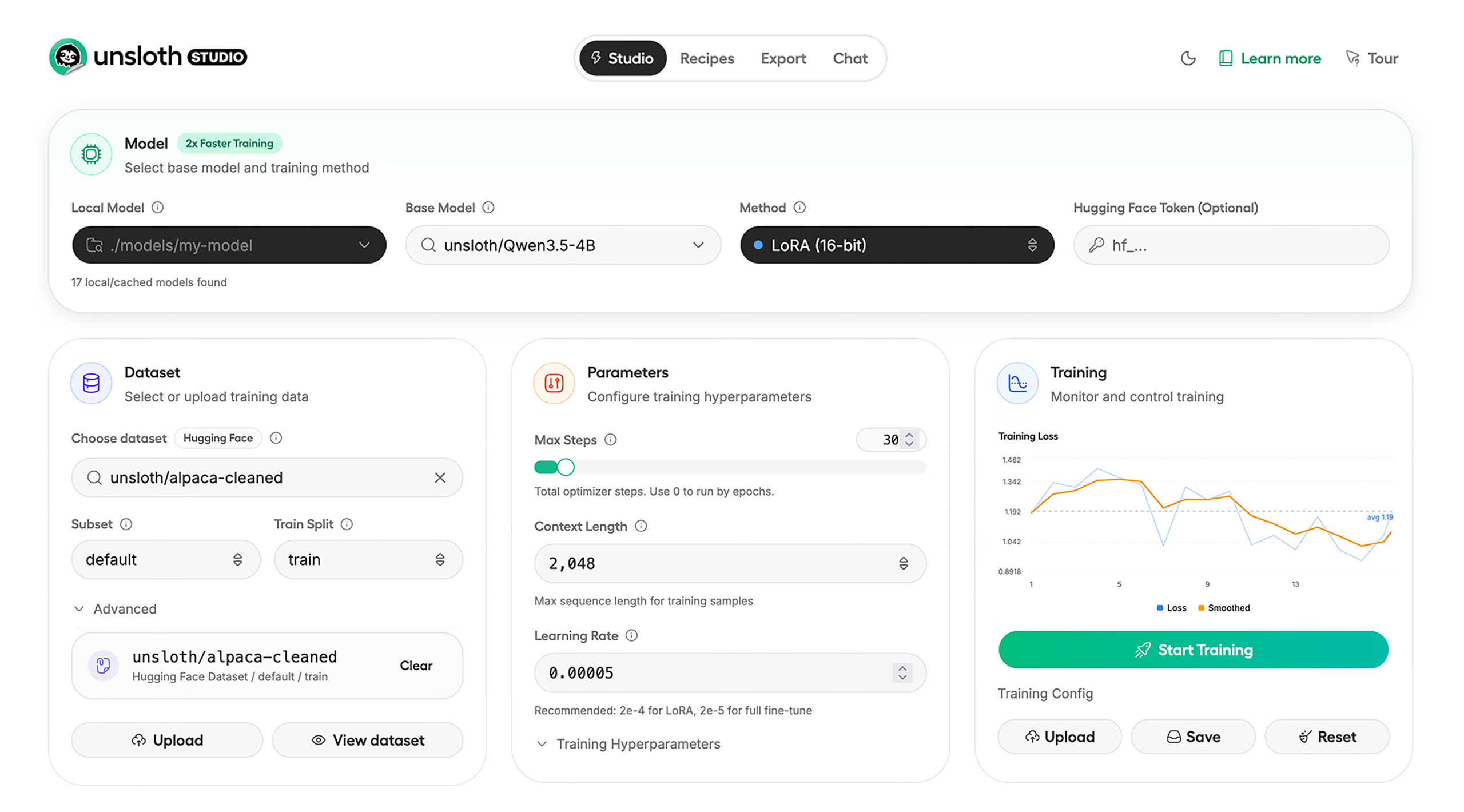
Unsloth Studio (Beta) lets you run and train text, audio, embedding, vision models on Windows, Linux and macOS.
⭐ Features
Unsloth provides several key features for both inference and training:
Inference
- Search + download + run models including GGUF, LoRA adapters, safetensors
- Export models: Save or export models to GGUF, 16-bit safetensors and other formats.
- Tool calling: Support for self-healing tool calling and web search
- Code execution: lets LLMs test code in Claude artifacts and sandbox environments
- Auto-tune inference parameters and customize chat templates.
- We work directly with teams behind gpt-oss, Qwen3, Llama 4, Mistral, Gemma 1-3, and Phi-4, where we’ve fixed bugs that improve model accuracy.
- Upload images, audio, PDFs, code, DOCX and more file types to chat with.
Training
- Train and RL 500+ models up to 2x faster with up to 70% less VRAM, with no accuracy loss.
- Custom Triton and mathematical kernels. See some collabs we did with PyTorch and Hugging Face.
- Data Recipes: Auto-create datasets from PDF, CSV, DOCX etc. Edit data in a visual-node workflow.
- Reinforcement Learning (RL): The most efficient RL library, using 80% less VRAM for GRPO, FP8 etc.
- Supports full fine-tuning, RL, pretraining, 4-bit, 16-bit and, FP8 training.
- Observability: Monitor training live, track loss and GPU usage and customize graphs.
- Multi-GPU training is supported, with major improvements coming soon.
⚡ Quickstart
Unsloth can be used in two ways: through Unsloth Studio, the web UI, or through Unsloth Core, the code-based version. Each has different requirements.
Unsloth Studio (web UI)
Unsloth Studio (Beta) works on Windows, Linux, WSL and macOS.
- CPU: Supported for Chat and Data Recipes currently
- NVIDIA: Training works on RTX 30/40/50, Blackwell, DGX Spark, Station and more
- macOS: Currently supports chat and Data Recipes. MLX training is coming very soon
- AMD: Chat + Data works. Train with Unsloth Core. Studio support is out soon.
- Coming soon: Training support for Apple MLX, AMD, and Intel.
- Multi-GPU: Available now, with a major upgrade on the way
macOS, Linux, WSL:
curl -fsSL https://unsloth.ai/install.sh | sh
Windows:
irm https://unsloth.ai/install.ps1 | iex
Launch
unsloth studio -H 0.0.0.0 -p 8888
Update
To update, use the same install commands as above. Or run (does not work on Windows):
unsloth studio update
Docker
Use our Docker image unsloth/unsloth container. Run:
docker run -d -e JUPYTER_PASSWORD="mypassword" \
  -p 8888:8888 -p 8000:8000 -p 2222:22 \
  -v $(pwd)/work:/workspace/work \
  --gpus all \
  unsloth/unsloth
Developer, Nightly, Uninstall
To see developer, nightly and uninstallation etc. instructions, see advanced installation.
Unsloth Core (code-based)
Linux, WSL:
curl -LsSf https://astral.sh/uv/install.sh | sh
uv venv unsloth_env --python 3.13
source unsloth_env/bin/activate
uv pip install unsloth --torch-backend=auto
Windows:
winget install -e --id Python.Python.3.13
winget install --id=astral-sh.uv  -e
uv venv unsloth_env --python 3.13
.\unsloth_env\Scripts\activate
uv pip install unsloth --torch-backend=auto
For Windows, pip install unsloth works only if you have PyTorch installed. Read our Windows Guide.
You can use the same Docker image as Unsloth Studio.
AMD, Intel:
For RTX 50x, B200, 6000 GPUs: uv pip install unsloth --torch-backend=auto. Read our guides for: Blackwell and DGX Spark.
To install Unsloth on AMD and Intel GPUs, follow our AMD Guide and Intel Guide.
📒 Free Notebooks
Train for free with our notebooks. You can use our new free Unsloth Studio notebook to run and train models for free in a web UI. Read our guide. Add dataset, run, then deploy your trained model.
| Model | Free Notebooks | Performance | Memory use |
|---|---|---|---|
| Gemma 4 (E2B) | ▶️ Start for free | 1.5x faster | 50% less |
| Qwen3.5 (4B) | ▶️ Start for free | 1.5x faster | 60% less |
| gpt-oss (20B) | ▶️ Start for free | 2x faster | 70% less |
| Qwen3.5 GSPO | ▶️ Start for free | 2x faster | 70% less |
| gpt-oss (20B): GRPO | ▶️ Start for free | 2x faster | 80% less |
| Qwen3: Advanced GRPO | ▶️ Start for free | 2x faster | 70% less |
| embeddinggemma (300M) | ▶️ Start for free | 2x faster | 20% less |
| Mistral Ministral 3 (3B) | ▶️ Start for free | 1.5x faster | 60% less |
| Llama 3.1 (8B) Alpaca | ▶️ Start for free | 2x faster | 70% less |
| Llama 3.2 Conversational | ▶️ Start for free | 2x faster | 70% less |
| Orpheus-TTS (3B) | ▶️ Start for free | 1.5x faster | 50% less |
- See all our notebooks for: Kaggle, GRPO, TTS, embedding & Vision
- See all our models and all our notebooks
- See detailed documentation for Unsloth here
🦥 Unsloth News
- Gemma 4: Run and train Google’s new models directly in Unsloth Studio! Blog
- Introducing Unsloth Studio: our new web UI for running and training LLMs. Blog
- Qwen3.5 - 0.8B, 2B, 4B, 9B, 27B, 35-A3B, 112B-A10B are now supported. Guide + notebooks
- Train MoE LLMs 12x faster with 35% less VRAM - DeepSeek, GLM, Qwen and gpt-oss. Blog
- Embedding models: Unsloth now supports ~1.8-3.3x faster embedding fine-tuning. Blog • Notebooks
- New 7x longer context RL vs. all other setups, via our new batching algorithms. Blog
- New RoPE & MLP Triton Kernels & Padding Free + Packing: 3x faster training & 30% less VRAM. Blog
- 500K Context: Training a 20B model with >500K context is now possible on an 80GB GPU. Blog
- FP8 & Vision RL: You can now do FP8 & VLM GRPO on consumer GPUs. FP8 Blog • Vision RL
- gpt-oss by OpenAI: Read our RL blog, Flex Attention blog and Guide.
📥 Advanced Installation
The below advanced instructions are for Unsloth Studio. For Unsloth Core advanced installation, view our docs.
Developer installs: macOS, Linux, WSL:
git clone https://github.com/unslothai/unsloth
cd unsloth
./install.sh --local
unsloth studio -H 0.0.0.0 -p 8888
Then to update :
unsloth studio update
Developer installs: Windows PowerShell:
git clone https://github.com/unslothai/unsloth.git
cd unsloth
Set-ExecutionPolicy -Scope Process -ExecutionPolicy Bypass
.\install.ps1 --local
unsloth studio -H 0.0.0.0 -p 8888
Then to update :
unsloth studio update
Nightly: MacOS, Linux, WSL:
git clone https://github.com/unslothai/unsloth
cd unsloth
git checkout nightly
./install.sh --local
unsloth studio -H 0.0.0.0 -p 8888
Then to launch every time:
unsloth studio -H 0.0.0.0 -p 8888
Nightly: Windows:
Run in Windows Powershell:
git clone https://github.com/unslothai/unsloth.git
cd unsloth
git checkout nightly
Set-ExecutionPolicy -Scope Process -ExecutionPolicy Bypass
.\install.ps1 --local
unsloth studio -H 0.0.0.0 -p 8888
Then to launch every time:
unsloth studio -H 0.0.0.0 -p 8888
Uninstall
You can uninstall Unsloth Studio by deleting its install folder usually located under $HOME/.unsloth/studio on Mac/Linux/WSL and %USERPROFILE%\.unsloth\studio on Windows. Using the rm -rf commands will delete everything, including your history, cache:
- MacOS, WSL, Linux:
rm -rf ~/.unsloth/studio - Windows (PowerShell):
Remove-Item -Recurse -Force "$HOME\.unsloth\studio"
For more info, see our docs.
Deleting model files
You can delete old model files either from the bin icon in model search or by removing the relevant cached model folder from the default Hugging Face cache directory. By default, HF uses:
- MacOS, Linux, WSL:
~/.cache/huggingface/hub/ - Windows:
%USERPROFILE%\.cache\huggingface\hub\
💚 Community and Links
| Type | Links |
|---|---|
 Discord Discord |
Join Discord server |
 r/unsloth Reddit r/unsloth Reddit |
Join Reddit community |
| 📚 Documentation & Wiki | Read Our Docs |
_logo_late_2025.svg) Twitter (aka X) Twitter (aka X) |
Follow us on X |
| 🔮 Our Models | Unsloth Catalog |
| ✍️ Blog | Read our Blogs |
Citation
You can cite the Unsloth repo as follows:
@software{unsloth,
  author = {Daniel Han, Michael Han and Unsloth team},
  title = {Unsloth},
  url = {https://github.com/unslothai/unsloth},
  year = {2023}
}
If you trained a model with 🦥Unsloth, you can use this cool sticker!
License
Unsloth uses a dual-licensing model of Apache 2.0 and AGPL-3.0. The core Unsloth package remains licensed under Apache 2.0, while certain optional components, such as the Unsloth Studio UI are licensed under the open-source license AGPL-3.0.
This structure helps support ongoing Unsloth development while keeping the project open source and enabling the broader ecosystem to continue growing.
Thank You to
- The llama.cpp library that lets users run and save models with Unsloth
- The Hugging Face team and their libraries: transformers and TRL
- The Pytorch and Torch AO team for their contributions
- NVIDIA for their NeMo DataDesigner library and their contributions
- And of course for every single person who has contributed or has used Unsloth!