- Python 71.5%
- TypeScript 22.7%
- Shell 1.9%
- PowerShell 1.6%
- Rust 1.5%
- Other 0.7%
 208862218d
* feat(db): add SQLite storage layer for training history * feat(api): add training history endpoints and response models * feat(training): integrate DB persistence into training event loop * feat(ui): add training history views and card grid * [pre-commit.ci] auto fixes from pre-commit.com hooks for more information, see https://pre-commit.ci * fix(studio): address review issues in training history persistence - Strip hf_token/wandb_token from config before SQLite storage - Add UUID suffix to job_id for collision resistance - Use isfinite() for 0.0 metric handling throughout - Respect _should_stop in error event finalization - Run schema DDL once per process, not per connection - Close connection on schema init failure - Guard cleanup_orphaned_runs at startup - Cap _metric_buffer at 500 entries - Make FLUSH_THRESHOLD a class constant - Map 'running' to 'training' phase in historical view - Derive LR/GradNorm from history arrays in historical view - Fix nested button with div[role=button] in history cards - Guard String(value) against null/undefined in config popover - Clear selectedHistoryRunId on auto tab switch * [pre-commit.ci] auto fixes from pre-commit.com hooks for more information, see https://pre-commit.ci * fix(studio): address round-2 review findings across training backend and frontend Backend (training.py): - Move state mutation after proc.start() so a failed spawn does not wedge the backend with is_training=True - Create DB run row eagerly after proc.start() so runs appear in history during model loading, not after first metric event - Rewrite _flush_metrics_to_db() with snapshot-before-insert pattern to preserve metrics arriving during the write and retain buffer on failure - Guard eval_loss with float() coercion and math.isfinite(), matching the existing grad_norm guard - Increase pump thread join timeout from 3s to 8s to cover SQLite's default 5s lock timeout Frontend (studio-page.tsx): - Fix history navigation: check isTrainingRunning instead of showTrainingView in onSelectRun so completed runs are not misrouted - Replace activeTab state + auto-switch useEffect with derived tab to eliminate react-hooks/set-state-in-effect lint violation Frontend (historical-training-view.tsx): - Add explicit "running" branch to message ternary so running runs no longer fall through to "Training errored" - Derive loading from detail/error state and move cleanup to effect return to eliminate react-hooks/set-state-in-effect lint violation Frontend (progress-section.tsx): - Derive stopRequested from isTrainingRunning && stopRequestedLocal to eliminate react-hooks/set-state-in-effect lint violation and remove unused useEffect import * [pre-commit.ci] auto fixes from pre-commit.com hooks for more information, see https://pre-commit.ci * fix(studio): resolve 3 remaining bugs from round-2 review 1. Stuck on Current Run tab [12/20]: Only force "current-run" tab when isTrainingRunning is true, not when stale completed-run data exists. After training ends, users can freely navigate to Configure. 2. Incomplete metric sanitization [7/20]: Apply float() coercion and isfinite() guards to loss and learning_rate, matching the existing pattern used by grad_norm and eval_loss. Prevents TypeError from string values and NaN leaks into history arrays. 3. Stop button state leak across runs [10/20]: Add key={runtime.jobId} to ProgressSection so React remounts it when a new run starts, resetting stopRequestedLocal state. * fix(studio): deduplicate loss/lr sanitization in training event handler Reuse _safe_loss/_safe_lr from the progress update block instead of re-sanitizing the same raw event values for metric history. * fix(studio): restore loss > 0 guard to prevent eval steps injecting 0.0 into metric histories Round-2/3 fixes relaxed the history append guard from `loss > 0` to `loss is not None`, which let eval-only log events (where loss defaults to 0.0) append fake zeros into loss_history and lr_history. Restore the `loss > 0` check to match the worker's own has_train_loss gate. The float() coercion and isfinite() sanitization from round-3 remain intact. * fix(studio): resolve training history bugs — nullable loss/lr, tab nav, sparkline * [pre-commit.ci] auto fixes from pre-commit.com hooks for more information, see https://pre-commit.ci * [pre-commit.ci] auto fixes from pre-commit.com hooks for more information, see https://pre-commit.ci --------- Co-authored-by: pre-commit-ci[bot] <66853113+pre-commit-ci[bot]@users.noreply.github.com> Co-authored-by: Daniel Han <danielhanchen@gmail.com> |
||
|---|---|---|
| .github | ||
| images | ||
| scripts | ||
| studio | ||
| tests | ||
| unsloth | ||
| unsloth_cli | ||
| .gitattributes | ||
| .gitignore | ||
| .pre-commit-ci.yaml | ||
| .pre-commit-config.yaml | ||
| build.sh | ||
| cli.py | ||
| CODE_OF_CONDUCT.md | ||
| CONTRIBUTING.md | ||
| COPYING | ||
| install.ps1 | ||
| install.sh | ||
| LICENSE | ||
| pyproject.toml | ||
| README.md | ||
| unsloth-cli.py | ||

Run and train AI models with a unified local interface.
Features • Quickstart • Notebooks • Documentation • Reddit
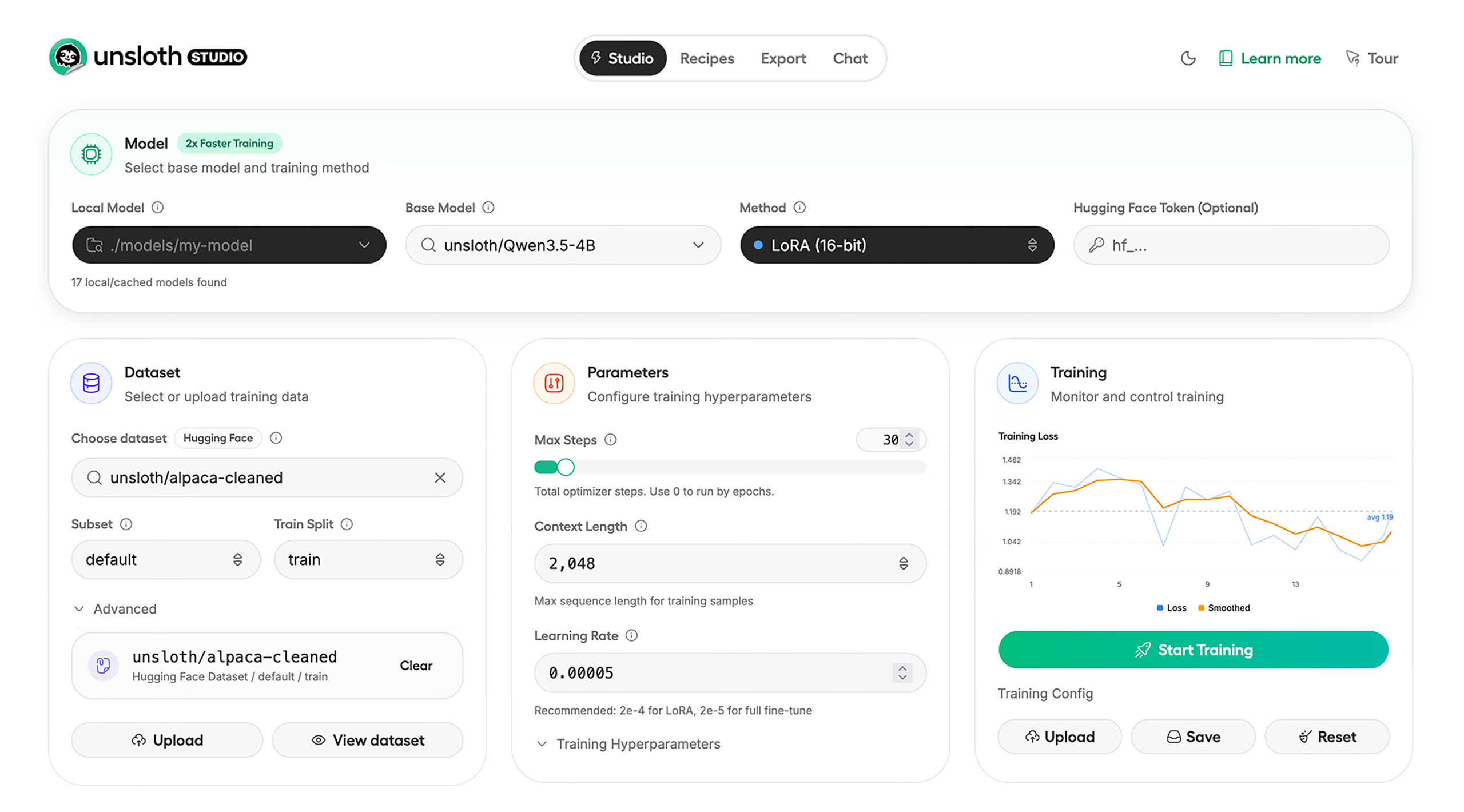
Unsloth Studio (Beta) lets you run and train text, audio, embedding, vision models on Windows, Linux and macOS.
⭐ Features
Unsloth provides several key features for both inference and training:
Inference
- Search + download + run models including GGUF, LoRA adapters, safetensors
- Export models: Save or export models to GGUF, 16-bit safetensors and other formats.
- Tool calling: Support for self-healing tool calling and web search
- Code execution: lets LLMs test code in Claude artifacts and sandbox environments
- Auto-tune inference parameters and customize chat templates.
- We work directly with teams behind gpt-oss, Qwen3, Llama 4, Mistral, Gemma 1-3, and Phi-4, where we’ve fixed bugs that improve model accuracy.
- Upload images, audio, PDFs, code, DOCX and more file types to chat with.
Training
- Train and RL 500+ models up to 2x faster with up to 70% less VRAM, with no accuracy loss.
- Custom Triton and mathematical kernels. See some collabs we did with PyTorch and Hugging Face.
- Data Recipes: Auto-create datasets from PDF, CSV, DOCX etc. Edit data in a visual-node workflow.
- Reinforcement Learning (RL): The most efficient RL library, using 80% less VRAM for GRPO, FP8 etc.
- Supports full fine-tuning, RL, pretraining, 4-bit, 16-bit and, FP8 training.
- Observability: Monitor training live, track loss and GPU usage and customize graphs.
- Multi-GPU training is supported, with major improvements coming soon.
⚡ Quickstart
Unsloth can be used in two ways: through Unsloth Studio, the web UI, or through Unsloth Core, the code-based version. Each has different requirements.
Unsloth Studio (web UI)
Unsloth Studio (Beta) works on Windows, Linux, WSL and macOS.
- CPU: Supported for Chat and Data Recipes currently
- NVIDIA: Training works on RTX 30/40/50, Blackwell, DGX Spark, Station and more
- macOS: Currently supports chat and Data Recipes. MLX training is coming very soon
- AMD: Chat + Data works. Train with Unsloth Core. Studio support is out soon.
- Coming soon: Training support for Apple MLX, AMD, and Intel.
- Multi-GPU: Available now, with a major upgrade on the way
macOS, Linux, WSL:
curl -fsSL https://unsloth.ai/install.sh | sh
If you don't have curl, use wget. Launch after setup via:
source unsloth_studio/bin/activate
unsloth studio -H 0.0.0.0 -p 8888
Windows:
irm https://unsloth.ai/install.ps1 | iex
Launch after setup via:
& .\unsloth_studio\Scripts\unsloth.exe studio -H 0.0.0.0 -p 8888
Docker
Use our Docker image unsloth/unsloth container. Run:
docker run -d -e JUPYTER_PASSWORD="mypassword" \
  -p 8888:8888 -p 8000:8000 -p 2222:22 \
  -v $(pwd)/work:/workspace/work \
  --gpus all \
  unsloth/unsloth
macOS, Linux, WSL developer installs:
curl -LsSf https://astral.sh/uv/install.sh | sh
uv venv unsloth_studio --python 3.13
source unsloth_studio/bin/activate
uv pip install unsloth --torch-backend=auto
unsloth studio setup
unsloth studio -H 0.0.0.0 -p 8888
Windows PowerShell developer installs:
winget install -e --id Python.Python.3.13
winget install --id=astral-sh.uv  -e
uv venv unsloth_studio --python 3.13
.\unsloth_studio\Scripts\activate
uv pip install unsloth --torch-backend=auto
unsloth studio setup
unsloth studio -H 0.0.0.0 -p 8888
Nightly - MacOS, Linux, WSL:
curl -LsSf https://astral.sh/uv/install.sh | sh
git clone --filter=blob:none https://github.com/unslothai/unsloth.git unsloth_studio
cd unsloth_studio
uv venv --python 3.13
source .venv/bin/activate
uv pip install -e . --torch-backend=auto
unsloth studio setup
unsloth studio -H 0.0.0.0 -p 8888
Then to launch every time:
cd unsloth_studio
source .venv/bin/activate
unsloth studio -H 0.0.0.0 -p 8888
Nightly - Windows:
Run in Windows Powershell:
winget install -e --id Python.Python.3.13
winget install --id=astral-sh.uv  -e
git clone --filter=blob:none https://github.com/unslothai/unsloth.git unsloth_studio
cd unsloth_studio
uv venv --python 3.13
.\.venv\Scripts\activate
uv pip install -e . --torch-backend=auto
unsloth studio setup
unsloth studio -H 0.0.0.0 -p 8888
Then to launch every time:
cd unsloth_studio
.\.venv\Scripts\activate
unsloth studio -H 0.0.0.0 -p 8888
Unsloth Core (code-based)
Linux, WSL:
curl -LsSf https://astral.sh/uv/install.sh | sh
uv venv unsloth_env --python 3.13
source unsloth_env/bin/activate
uv pip install unsloth --torch-backend=auto
Windows:
winget install -e --id Python.Python.3.13
winget install --id=astral-sh.uv  -e
uv venv unsloth_env --python 3.13
.\unsloth_env\Scripts\activate
uv pip install unsloth --torch-backend=auto
For Windows, pip install unsloth works only if you have PyTorch installed. Read our Windows Guide.
You can use the same Docker image as Unsloth Studio.
AMD, Intel:
For RTX 50x, B200, 6000 GPUs: uv pip install unsloth --torch-backend=auto. Read our guides for: Blackwell and DGX Spark.
To install Unsloth on AMD and Intel GPUs, follow our AMD Guide and Intel Guide.
✨ Free Notebooks
Train for free with our notebooks. Read our guide. Add dataset, run, then deploy your trained model.
| Model | Free Notebooks | Performance | Memory use |
|---|---|---|---|
| Qwen3.5 (4B) | ▶️ Start for free | 1.5x faster | 60% less |
| gpt-oss (20B) | ▶️ Start for free | 2x faster | 70% less |
| Qwen3.5 GSPO | ▶️ Start for free | 2x faster | 70% less |
| gpt-oss (20B): GRPO | ▶️ Start for free | 2x faster | 80% less |
| Qwen3: Advanced GRPO | ▶️ Start for free | 2x faster | 70% less |
| Gemma 3 (4B) Vision | ▶️ Start for free | 1.7x faster | 60% less |
| embeddinggemma (300M) | ▶️ Start for free | 2x faster | 20% less |
| Mistral Ministral 3 (3B) | ▶️ Start for free | 1.5x faster | 60% less |
| Llama 3.1 (8B) Alpaca | ▶️ Start for free | 2x faster | 70% less |
| Llama 3.2 Conversational | ▶️ Start for free | 2x faster | 70% less |
| Orpheus-TTS (3B) | ▶️ Start for free | 1.5x faster | 50% less |
- See all our notebooks for: Kaggle, GRPO, TTS, embedding & Vision
- See all our models and all our notebooks
- See detailed documentation for Unsloth here
🦥 Unsloth News
- Introducing Unsloth Studio: our new web UI for running and training LLMs. Blog
- Qwen3.5 - 0.8B, 2B, 4B, 9B, 27B, 35-A3B, 112B-A10B are now supported. Guide + notebooks
- Train MoE LLMs 12x faster with 35% less VRAM - DeepSeek, GLM, Qwen and gpt-oss. Blog
- Embedding models: Unsloth now supports ~1.8-3.3x faster embedding fine-tuning. Blog • Notebooks
- New 7x longer context RL vs. all other setups, via our new batching algorithms. Blog
- New RoPE & MLP Triton Kernels & Padding Free + Packing: 3x faster training & 30% less VRAM. Blog
- 500K Context: Training a 20B model with >500K context is now possible on an 80GB GPU. Blog
- FP8 & Vision RL: You can now do FP8 & VLM GRPO on consumer GPUs. FP8 Blog • Vision RL
- gpt-oss by OpenAI: Read our RL blog, Flex Attention blog and Guide.
💚 Community and Links
| Type | Links |
|---|---|
 Discord Discord |
Join Discord server |
 r/unsloth Reddit r/unsloth Reddit |
Join Reddit community |
| 📚 Documentation & Wiki | Read Our Docs |
_logo_late_2025.svg) Twitter (aka X) Twitter (aka X) |
Follow us on X |
| 🔮 Our Models | Unsloth Catalog |
| ✍️ Blog | Read our Blogs |
Citation
You can cite the Unsloth repo as follows:
@software{unsloth,
  author = {Daniel Han, Michael Han and Unsloth team},
  title = {Unsloth},
  url = {https://github.com/unslothai/unsloth},
  year = {2023}
}
If you trained a model with 🦥Unsloth, you can use this cool sticker!
License
Unsloth uses a dual-licensing model of Apache 2.0 and AGPL-3.0. The core Unsloth package remains licensed under Apache 2.0, while certain optional components, such as the Unsloth Studio UI are licensed under the open-source license AGPL-3.0.
This structure helps support ongoing Unsloth development while keeping the project open source and enabling the broader ecosystem to continue growing.
Thank You to
- The llama.cpp library that lets users run and save models with Unsloth
- The Hugging Face team and their libraries: transformers and TRL
- The Pytorch and Torch AO team for their contributions
- NVIDIA for their NeMo DataDesigner library and their contributions
- And of course for every single person who has contributed or has used Unsloth!