
Features • Quickstart • Notebooks • Documentation • Discord
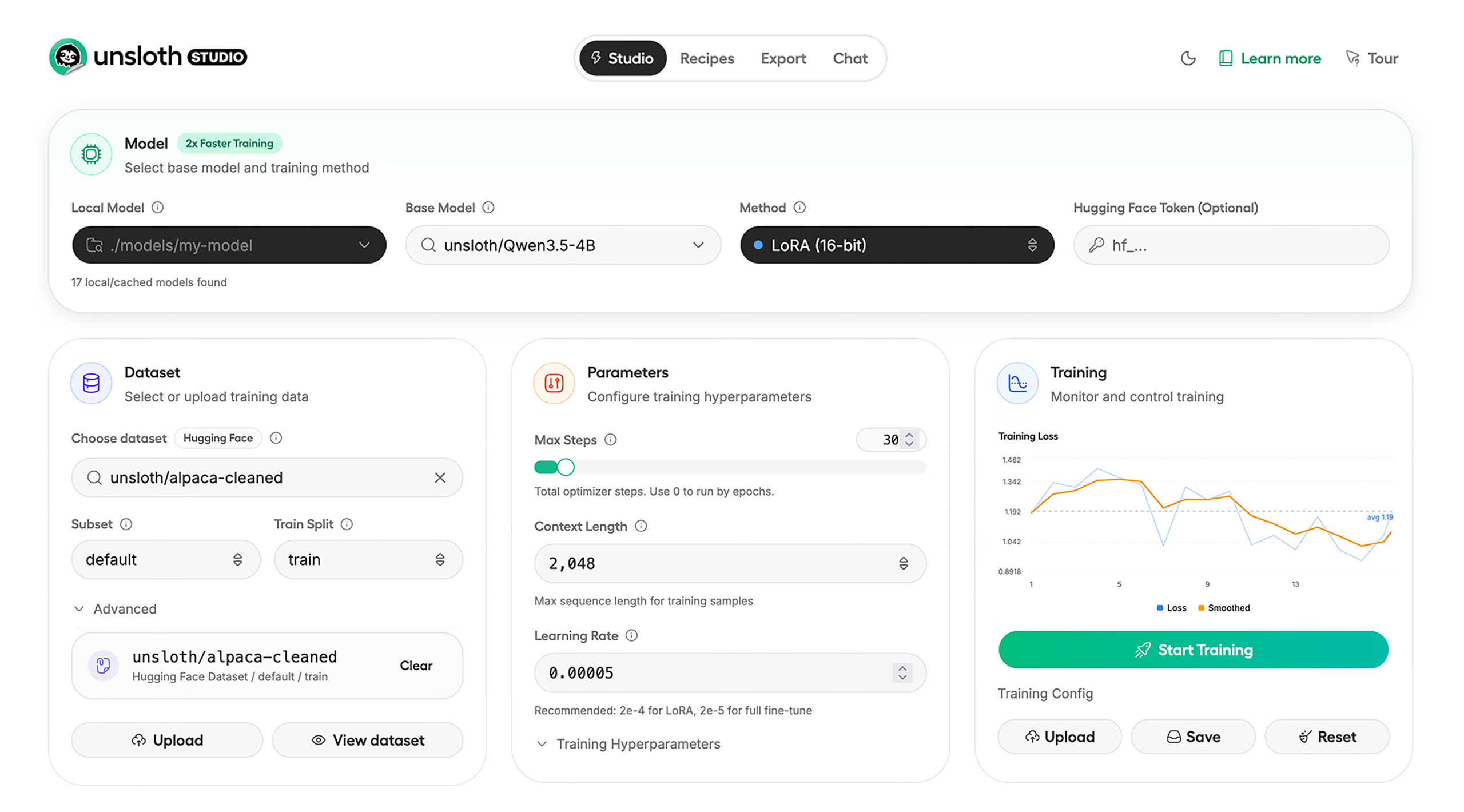 Unsloth Studio lets you run and train models for text, [audio](https://unsloth.ai/docs/basics/text-to-speech-tts-fine-tuning), [embedding](https://unsloth.ai/docs/new/embedding-finetuning), [vision](https://unsloth.ai/docs/basics/vision-fine-tuning) and more. Available on Windows, Linux and macOS.
## ⭐ Features
Unsloth provides several key features for both inference and training:
### Inference
* **Search + download + run models** including GGUF, LoRA adapters, safetensors
* **Export models**: [Save or export](https://unsloth.ai/docs/new/studio/export) models to GGUF, 16-bit safetensors and other formats.
* **Tool calling**: Support for [self-healing tool calling](https://unsloth.ai/docs/new/studio/chat#auto-healing-tool-calling) and web search
* **[Code execution](https://unsloth.ai/docs/new/studio/chat#code-execution)**: lets LLMs run code, data and verify results so answers are more accurate.
* [Auto-tune inference parameters](https://unsloth.ai/docs/new/studio/chat#auto-parameter-tuning) and customize chat templates.
* Upload images, audio, PDFs, code, DOCX and more file types to chat with.
### Training
* Train **500+ models** up to **2x faster** with up to **70% less VRAM**, with no accuracy loss.
* Supports full fine-tuning, pretraining, 4-bit, 16-bit and, FP8 training.
* **Observability**: Monitor training live, track loss and GPU usage and customize graphs.
* **Data Recipes**: [Auto-create datasets](https://unsloth.ai/docs/new/studio/data-recipe) from **PDF, CSV, DOCX** etc. Edit data in a visual-node workflow.
* **Reinforcement Learning**: The most efficient [RL](https://unsloth.ai/docs/get-started/reinforcement-learning-rl-guide) library, using **80% less VRAM** for GRPO, [FP8](https://unsloth.ai/docs/get-started/reinforcement-learning-rl-guide/fp8-reinforcement-learning) etc.
* [Multi-GPU](https://unsloth.ai/docs/basics/multi-gpu-training-with-unsloth) training is supported, with major improvements coming soon.
## ⚡ Quickstart
Unsloth can be used in two ways: through **[Unsloth Studio](https://unsloth.ai/docs/new/studio/)**, the web UI, or through **Unsloth Core**, the code-based version. Each has different requirements.
### Unsloth Studio (web UI)
Unsloth Studio works on **Windows, Linux, WSL** and **macOS**.
* **CPU:** Supported for **chat inference only**
* **NVIDIA:** Training works on RTX 30/40/50, Blackwell, DGX Spark, Station and more
* **macOS:** Currently supports chat only; **MLX training** is coming very soon
* **AMD:** Chat works. Train with [Unsloth Core](#unsloth-core-code-based). Studio support is coming soon.
* **Coming soon:** Training support for Apple MLX, AMD, and Intel.
* **Multi-GPU:** Available now, with a major upgrade on the way
#### Windows, MacOS, Linux or WSL:
```
pip install --upgrade pip && pip install uv
uv pip install unsloth --torch-backend=auto
unsloth studio setup
unsloth studio -H 0.0.0.0 -p 8888
```
Use our [Docker image](https://hub.docker.com/r/unsloth/unsloth) ```unsloth/unsloth``` container. Read our [Docker Guide](https://unsloth.ai/docs/get-started/install/docker).
You can also install directly from source:
```
pip install --upgrade pip && pip install uv
git clone --filter=blob:none https://github.com/unslothai/unsloth.git
cd unsloth
uv pip install -e . --torch-backend=auto
unsloth studio setup
unsloth studio -H 0.0.0.0 -p 8888
```
### Unsloth Core (code-based)
#### Windows, Linux, WSL
```bash
pip install --upgrade pip && pip install uv
uv pip install unsloth --torch-backend=auto
```
For Windows, `pip install unsloth` works only if you have Pytorch installed. Read our [Windows Guide](https://unsloth.ai/docs/get-started/install/windows-installation).
You can use the same Docker image as Unsloth Studio.
#### AMD, Intel
For RTX 50x, B200, 6000 GPUs: `uv pip install unsloth --torch-backend=auto`. Read our guides for: [Blackwell](https://unsloth.ai/docs/blog/fine-tuning-llms-with-blackwell-rtx-50-series-and-unsloth) and [DGX Spark](https://unsloth.ai/docs/blog/fine-tuning-llms-with-nvidia-dgx-spark-and-unsloth).
Unsloth Studio lets you run and train models for text, [audio](https://unsloth.ai/docs/basics/text-to-speech-tts-fine-tuning), [embedding](https://unsloth.ai/docs/new/embedding-finetuning), [vision](https://unsloth.ai/docs/basics/vision-fine-tuning) and more. Available on Windows, Linux and macOS.
## ⭐ Features
Unsloth provides several key features for both inference and training:
### Inference
* **Search + download + run models** including GGUF, LoRA adapters, safetensors
* **Export models**: [Save or export](https://unsloth.ai/docs/new/studio/export) models to GGUF, 16-bit safetensors and other formats.
* **Tool calling**: Support for [self-healing tool calling](https://unsloth.ai/docs/new/studio/chat#auto-healing-tool-calling) and web search
* **[Code execution](https://unsloth.ai/docs/new/studio/chat#code-execution)**: lets LLMs run code, data and verify results so answers are more accurate.
* [Auto-tune inference parameters](https://unsloth.ai/docs/new/studio/chat#auto-parameter-tuning) and customize chat templates.
* Upload images, audio, PDFs, code, DOCX and more file types to chat with.
### Training
* Train **500+ models** up to **2x faster** with up to **70% less VRAM**, with no accuracy loss.
* Supports full fine-tuning, pretraining, 4-bit, 16-bit and, FP8 training.
* **Observability**: Monitor training live, track loss and GPU usage and customize graphs.
* **Data Recipes**: [Auto-create datasets](https://unsloth.ai/docs/new/studio/data-recipe) from **PDF, CSV, DOCX** etc. Edit data in a visual-node workflow.
* **Reinforcement Learning**: The most efficient [RL](https://unsloth.ai/docs/get-started/reinforcement-learning-rl-guide) library, using **80% less VRAM** for GRPO, [FP8](https://unsloth.ai/docs/get-started/reinforcement-learning-rl-guide/fp8-reinforcement-learning) etc.
* [Multi-GPU](https://unsloth.ai/docs/basics/multi-gpu-training-with-unsloth) training is supported, with major improvements coming soon.
## ⚡ Quickstart
Unsloth can be used in two ways: through **[Unsloth Studio](https://unsloth.ai/docs/new/studio/)**, the web UI, or through **Unsloth Core**, the code-based version. Each has different requirements.
### Unsloth Studio (web UI)
Unsloth Studio works on **Windows, Linux, WSL** and **macOS**.
* **CPU:** Supported for **chat inference only**
* **NVIDIA:** Training works on RTX 30/40/50, Blackwell, DGX Spark, Station and more
* **macOS:** Currently supports chat only; **MLX training** is coming very soon
* **AMD:** Chat works. Train with [Unsloth Core](#unsloth-core-code-based). Studio support is coming soon.
* **Coming soon:** Training support for Apple MLX, AMD, and Intel.
* **Multi-GPU:** Available now, with a major upgrade on the way
#### Windows, MacOS, Linux or WSL:
```
pip install --upgrade pip && pip install uv
uv pip install unsloth --torch-backend=auto
unsloth studio setup
unsloth studio -H 0.0.0.0 -p 8888
```
Use our [Docker image](https://hub.docker.com/r/unsloth/unsloth) ```unsloth/unsloth``` container. Read our [Docker Guide](https://unsloth.ai/docs/get-started/install/docker).
You can also install directly from source:
```
pip install --upgrade pip && pip install uv
git clone --filter=blob:none https://github.com/unslothai/unsloth.git
cd unsloth
uv pip install -e . --torch-backend=auto
unsloth studio setup
unsloth studio -H 0.0.0.0 -p 8888
```
### Unsloth Core (code-based)
#### Windows, Linux, WSL
```bash
pip install --upgrade pip && pip install uv
uv pip install unsloth --torch-backend=auto
```
For Windows, `pip install unsloth` works only if you have Pytorch installed. Read our [Windows Guide](https://unsloth.ai/docs/get-started/install/windows-installation).
You can use the same Docker image as Unsloth Studio.
#### AMD, Intel
For RTX 50x, B200, 6000 GPUs: `uv pip install unsloth --torch-backend=auto`. Read our guides for: [Blackwell](https://unsloth.ai/docs/blog/fine-tuning-llms-with-blackwell-rtx-50-series-and-unsloth) and [DGX Spark](https://unsloth.ai/docs/blog/fine-tuning-llms-with-nvidia-dgx-spark-and-unsloth).  **r/unsloth Reddit** | [Join Reddit community](https://reddit.com/r/unsloth) |
| 📚 **Documentation & Wiki** | [Read Our Docs](https://unsloth.ai/docs) |
|
**r/unsloth Reddit** | [Join Reddit community](https://reddit.com/r/unsloth) |
| 📚 **Documentation & Wiki** | [Read Our Docs](https://unsloth.ai/docs) |
| _logo_late_2025.svg) **Twitter (aka X)** | [Follow us on X](https://twitter.com/unslothai) |
| 💾 **Installation** | [Pip & Docker Install](https://unsloth.ai/docs/get-started/install) |
| 🔮 **Our Models** | [Unsloth Catalog](https://unsloth.ai/docs/get-started/unsloth-model-catalog) |
| ✍️ **Blog** | [Read our Blogs](https://unsloth.ai/blog) |
### Citation
You can cite the Unsloth repo as follows:
```bibtex
@software{unsloth,
author = {Daniel Han, Michael Han and Unsloth team},
title = {Unsloth},
url = {https://github.com/unslothai/unsloth},
year = {2023}
}
```
If you trained a model with 🦥Unsloth, you can use this cool sticker!
**Twitter (aka X)** | [Follow us on X](https://twitter.com/unslothai) |
| 💾 **Installation** | [Pip & Docker Install](https://unsloth.ai/docs/get-started/install) |
| 🔮 **Our Models** | [Unsloth Catalog](https://unsloth.ai/docs/get-started/unsloth-model-catalog) |
| ✍️ **Blog** | [Read our Blogs](https://unsloth.ai/blog) |
### Citation
You can cite the Unsloth repo as follows:
```bibtex
@software{unsloth,
author = {Daniel Han, Michael Han and Unsloth team},
title = {Unsloth},
url = {https://github.com/unslothai/unsloth},
year = {2023}
}
```
If you trained a model with 🦥Unsloth, you can use this cool sticker!  ### License
Unsloth uses a dual-licensing model of Apache 2.0 and AGPL-3.0. The core Unsloth package remains licensed under **[Apache 2.0](https://github.com/unslothai/unsloth?tab=Apache-2.0-1-ov-file)**, while certain optional components, such as the Unsloth Studio UI are licensed under **[AGPL-3.0](https://github.com/unslothai/unsloth?tab=AGPL-3.0-2-ov-file)**.
This structure helps support ongoing Unsloth development while keeping the project open source and enabling the broader ecosystem to continue growing.
### Thank You to
- The [llama.cpp library](https://github.com/ggml-org/llama.cpp) that lets users run and save models with Unsloth
- The Hugging Face team and their libraries: [transformers](https://github.com/huggingface/transformers) and [TRL](https://github.com/huggingface/trl)
- The Pytorch and [Torch AO](https://github.com/unslothai/unsloth/pull/3391) team for their contributions
- And of course for every single person who has contributed or has used Unsloth!
### License
Unsloth uses a dual-licensing model of Apache 2.0 and AGPL-3.0. The core Unsloth package remains licensed under **[Apache 2.0](https://github.com/unslothai/unsloth?tab=Apache-2.0-1-ov-file)**, while certain optional components, such as the Unsloth Studio UI are licensed under **[AGPL-3.0](https://github.com/unslothai/unsloth?tab=AGPL-3.0-2-ov-file)**.
This structure helps support ongoing Unsloth development while keeping the project open source and enabling the broader ecosystem to continue growing.
### Thank You to
- The [llama.cpp library](https://github.com/ggml-org/llama.cpp) that lets users run and save models with Unsloth
- The Hugging Face team and their libraries: [transformers](https://github.com/huggingface/transformers) and [TRL](https://github.com/huggingface/trl)
- The Pytorch and [Torch AO](https://github.com/unslothai/unsloth/pull/3391) team for their contributions
- And of course for every single person who has contributed or has used Unsloth!